
Buyer portal major redesign · H5 scan support
The Jenny buyer portal is a tool for enterprise customers to browse samples, make selections, and send inquiries. This major redesign accomplishes three things:
- Complete rebuild: comprehensive upgrade of UI / workflow / performance
- H5 scan support: it can now be opened in non-WeChat contexts (phone system camera, WhatsApp, Alipay, QQ, Line, Telegram, overseas browsers, and more)
- 17-language support: overseas customers can read it and send inquiries in their local language
Redesign highlights
1. Brand-new architecture and interface
- Rebuilt on a brand-new front-end framework, with faster first-screen loading and smoother list scrolling
- Product cards and sample detail pages have a fully updated UI, better suited to mobile browsing habits
- Image lazy-loading and smart thumbnail switching mean smooth browsing even on weak networks
2. Scan straight to sample details
- Scan a sample label or share card sent by a salesperson to open the corresponding sample detail directly
- Sample detail pages are viewable without logging in, so the buyer's browsing isn't interrupted
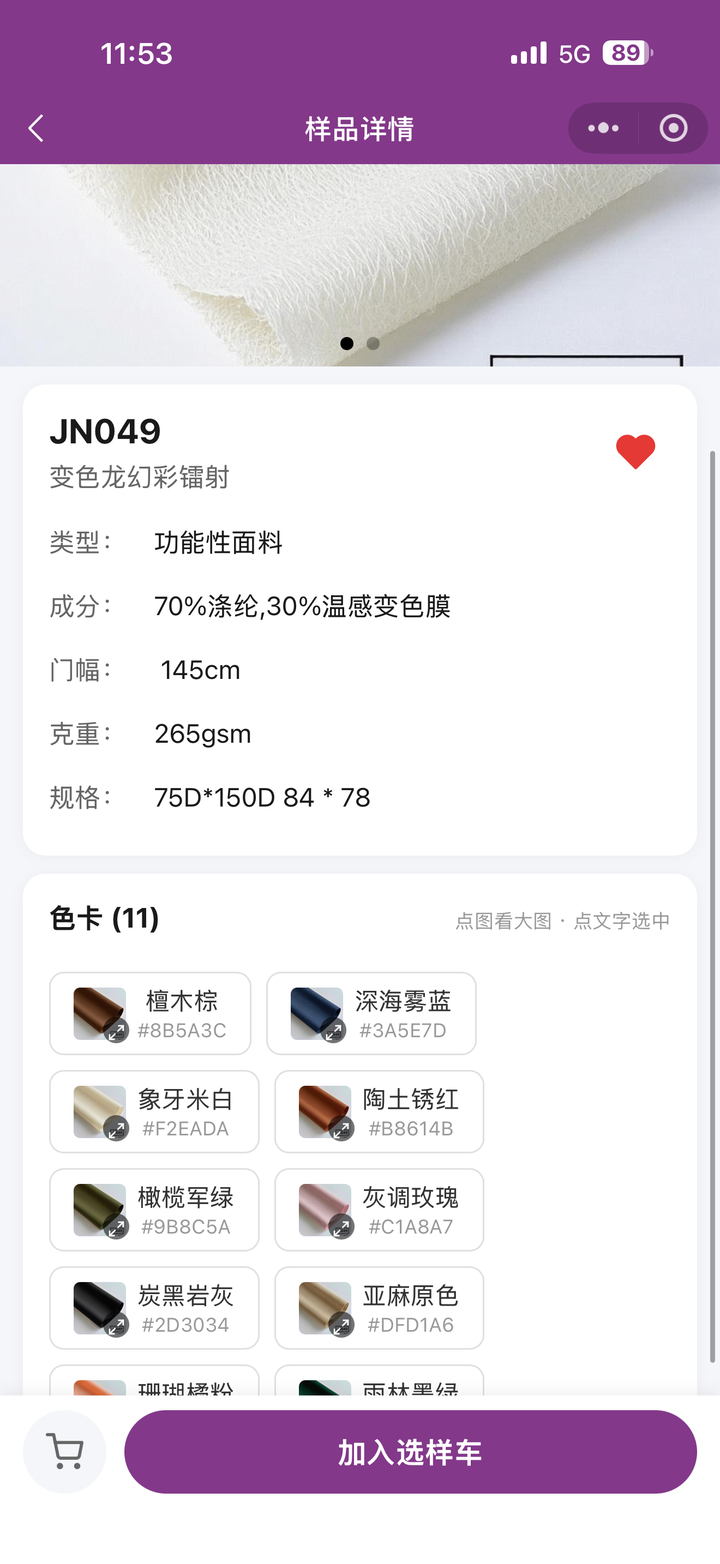
- A large image at the top + basic information (composition/width/weight/price) + a color card grid below (multiple color SKUs at a glance)
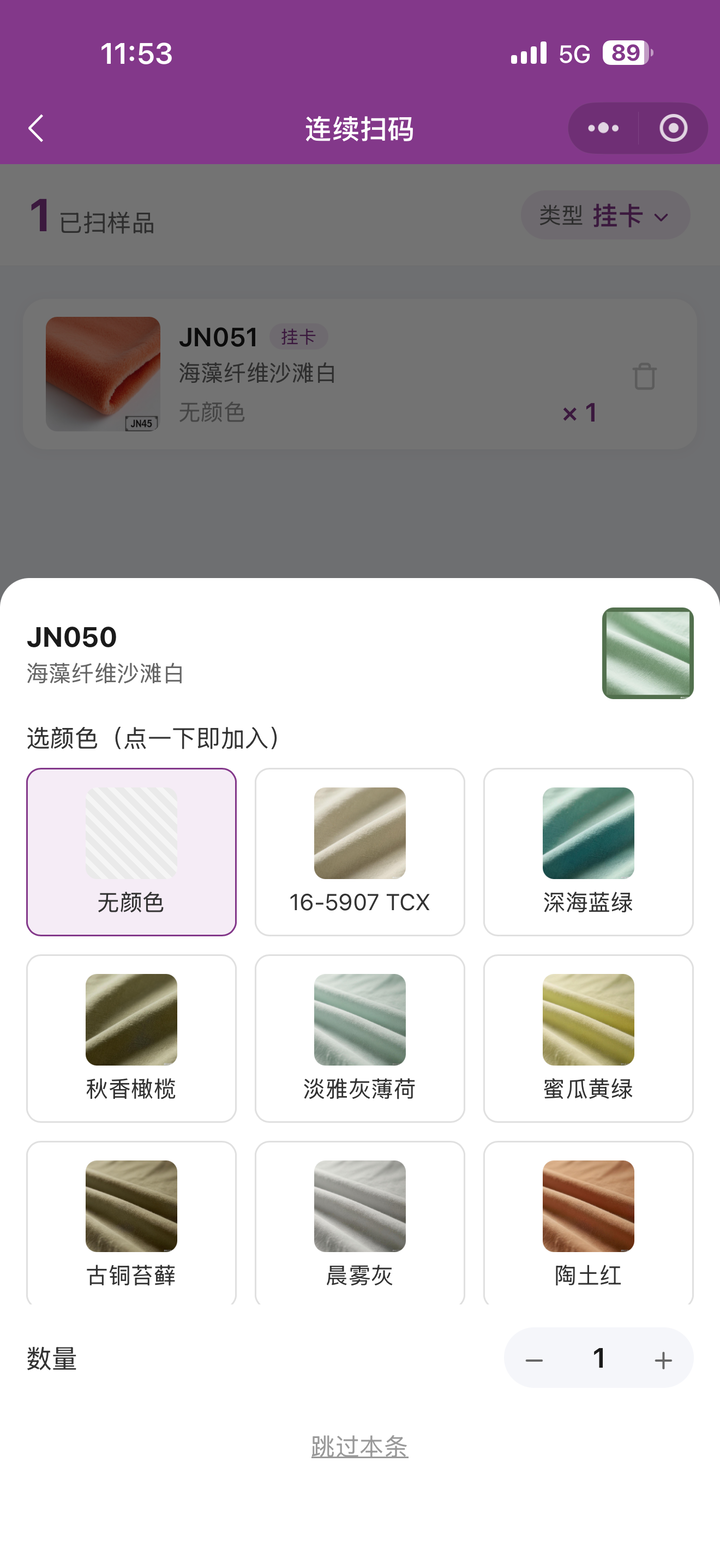
- An "Add to selection cart" button at the bottom; tapping it brings up continuous scanning / color selection
3. Selection cart (home tab)
- The buyer lands on the "selection cart" as soon as they enter the Mini-Program home page
- Put samples you like into the selection cart first; they're still kept after you close and reopen
- Different colors / specifications of the same sample are added independently
- Continuous scanning mode: after scanning one hang tag you can scan the next right away, greatly improving efficiency
- The selection cart supports select-all, quantity changes, and batch deletion
- Submit in one tap → a "selection order" is generated automatically, and the enterprise side is notified in real time
4. Favorites + browsing history
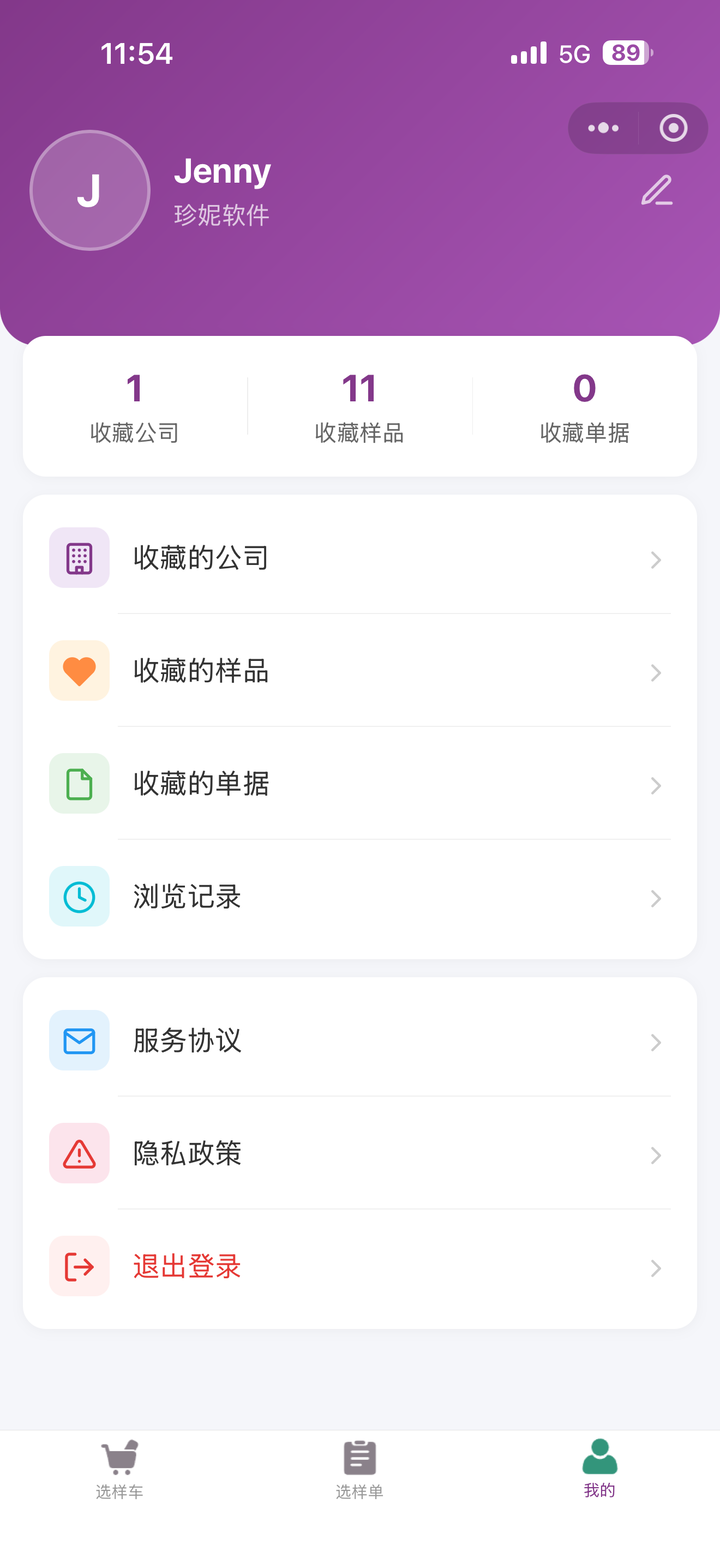
The "My" page centrally manages all buyer activity:
- Stats at the top: three counts — favorited companies / favorited samples / favorited documents
- Favorited companies: favorite suppliers of interest in one tap, and go straight back into the store to see new items next time
- Favorited samples: favorite fabrics you fancy in one tap for easy review
- Favorited documents: quotations / sample dispatch orders / sales orders / purchase orders sent by salespeople can also be favorited
- Browsing history: samples / documents recently viewed are recorded automatically, shown as relative times, with long-press to delete and one-tap clear all
- 3 tabs at the bottom: selection cart / selection orders / My
5. Inquiry / quotation loop
- Buyers can start an inquiry directly on the sample detail page
- The enterprise's salesperson is notified → quotes on the PC or in the app
- Once the quotation comes back, the buyer is notified in the Mini-Program and can view the full quotation details
- The entire process stays within the Mini-Program
6. View documents sent by salespeople
Whatever document a salesperson shares, the buyer can open it and see the full content:
- Quotation: includes validity period, total amount, currency, minimum order quantity
- Sample dispatch order: includes logistics tracking, copy order number
- Sales order: includes shipping progress bar, status tag
- Purchase order: includes receiving progress
Dual-channel support: WeChat Mini-Program + browser H5
WeChat users
- Scan a sample label → automatically open the Jenny WeChat Mini-Program "Jenny Software"
- The most complete experience: supports one-tap WeChat authorized login, WeChat account login, and message push
Non-WeChat users (H5 scan)
The old QR code can now be opened in almost any phone environment:
| Scenario | Available? |
|---|---|
| WeChat Scan | ✅ → Mini-Program |
| Phone system camera | ✅ → H5 |
| WhatsApp / Telegram / Line / Messenger | ✅ → H5 |
| Alipay / QQ / UC / Douyin / Xiaohongshu | ✅ → H5 |
| Safari / Chrome / Edge / Firefox | ✅ → H5 |
| Links in email / SMS | ✅ → H5 |
H5 likewise supports: browsing sample details, adding to the selection cart, starting an inquiry, and favoriting. No app installation needed — just scan or tap the link to use it.
Overseas customers can scan too
Overseas mainstream messaging apps such as WhatsApp, Telegram, Line, and Messenger all open links in a browser engine, so they automatically jump to the H5 web version, an experience just as smooth as Alipay or QQ in China.
One QR code, automatic adaptation
- The salesperson only needs to print one kind of sample label, with no need to prepare two sets for WeChat users and overseas users
- After scanning, the system automatically detects the user's environment and routes to the right version
- The old QR code remains valid — no need to reprint
Why this matters
Every scan scenario can open the sample page directly — WeChat scans into the Mini-Program, the camera/overseas apps scan into H5. One kind of label from the salesperson covers all customers, and overseas customers don't have to switch network environments.
Multilingual support (overseas-friendly)
The buyer portal now supports 17 languages, making it convenient for overseas customers:
Simplified Chinese / English / Russian / Korean / French / Vietnamese / Italian / Turkish / Japanese / German / Spanish / Portuguese / Arabic / Thai / Bengali / Indonesian / Traditional Chinese
- The browser H5 automatically selects the interface language based on the system language
- Users can also switch the interface language manually
- Sample details, selection cart, documents, favorites, inquiries, and other features are all localized throughout
An overseas customer in their own country scans a sample label via WhatsApp → automatically jumps to H5 → sees a local-language interface → sends an inquiry right back. The entire process depends on neither WeChat nor Chinese.
Login strategy
| Entry method | Login required? |
|---|---|
| WeChat scan of a sample label → view sample details | ❌ No login needed |
| Tap a WeChat share card → document details | ✅ Login required |
| H5 scan | Not mandatory; login required for "favoriting / selection cart / inquiry" |
| Favoriting / adding to selection cart / contacting sales / viewing browsing history | ✅ Login required |
Login methods:
- WeChat Mini-Program: one-tap WeChat authorization (fastest) / WeChat account login / mobile number + SMS verification code
- Browser H5: mobile number + SMS verification code
Use cases
- Face-to-face order-taking in a store: the customer uses their own phone to scan the QR code on a fabric hang tag and instantly view the large image and specs
- Handing out samples at a trade show: hand out sample cards printed with a QR code, and after returning home the customer scans to browse the full set of samples online
- Cross-platform sharing: share the showroom link in a WeChat group, email, SMS, or WhatsApp, and the customer can open it whatever app they use
- Overseas customers: overseas customers without WeChat can use the browser H5 directly to experience full features, with the local language adapted automatically
How to find the buyer portal
Customers find you
- Search the Mini-Program in WeChat: "Jenny Software"
- Scan a sample label / share card sent by a salesperson to jump automatically
- Non-WeChat scan → automatically enters the H5 web version
Salespeople tell customers
- Share your company business card with the customer → the customer sees your company in the Mini-Program
- Share a sample with the customer → the customer taps to view it directly
- Photograph a sample label and send it to the customer → the customer scans it to view it
How to enable
Buyer portal 2.0 and the H5 scan flow are being opened gradually. Whether a scan lands directly on the new page depends on the current company configuration, the QR-code type on the label, and the scanning environment; use the actual scan result as the source of truth.
- To customize your enterprise showroom's appearance, go to the Web showroom introduction
- To deploy a standalone WeChat Mini-Program showroom for your company, go to WeChat Mini-Program showroom
- For how to design and print sample labels, see Label printing settings
FAQ
Q: What if a customer doesn't have WeChat?
A: Have them use their phone's built-in camera to scan the sample label, and it automatically jumps to the H5 web version, where they can likewise view samples, add to the selection cart, and send inquiries. Links in overseas social apps such as WhatsApp / Telegram / Line can also be opened directly.
Q: Do I need to reprint sample labels?
A: No. The QR codes on old labels remain valid; scanning them automatically adapts to the new Mini-Program or H5.
Q: Can overseas customers use it?
A: Yes. Overseas customers can enter the H5 version simply by scanning with a browser, and the interface automatically switches to their local language. The login method is mobile number + SMS verification code.
Q: Is the previous (old) Mini-Program still around?
A: The new Mini-Program supersedes the old one; customers don't have to switch anything — just search "Jenny Software".
Q: Will buyers' favorites and selection cart data be lost?
A: No, the account is in the cloud. When a buyer switches between the Mini-Program and H5 using the same mobile number, the data is synced.
Related articles
- Sample management — how to enter the content buyers see
- Sample stock — samples sent out are deducted from stock automatically
- Quotations, sample dispatch orders, and selection orders — what documents to send buyers
- Web showroom introduction — the company showroom used together with the buyer portal
- WeChat Mini-Program showroom — how the showroom appears in the Mini-Program
- Label printing settings — sample label design and printing