
Production Order Management
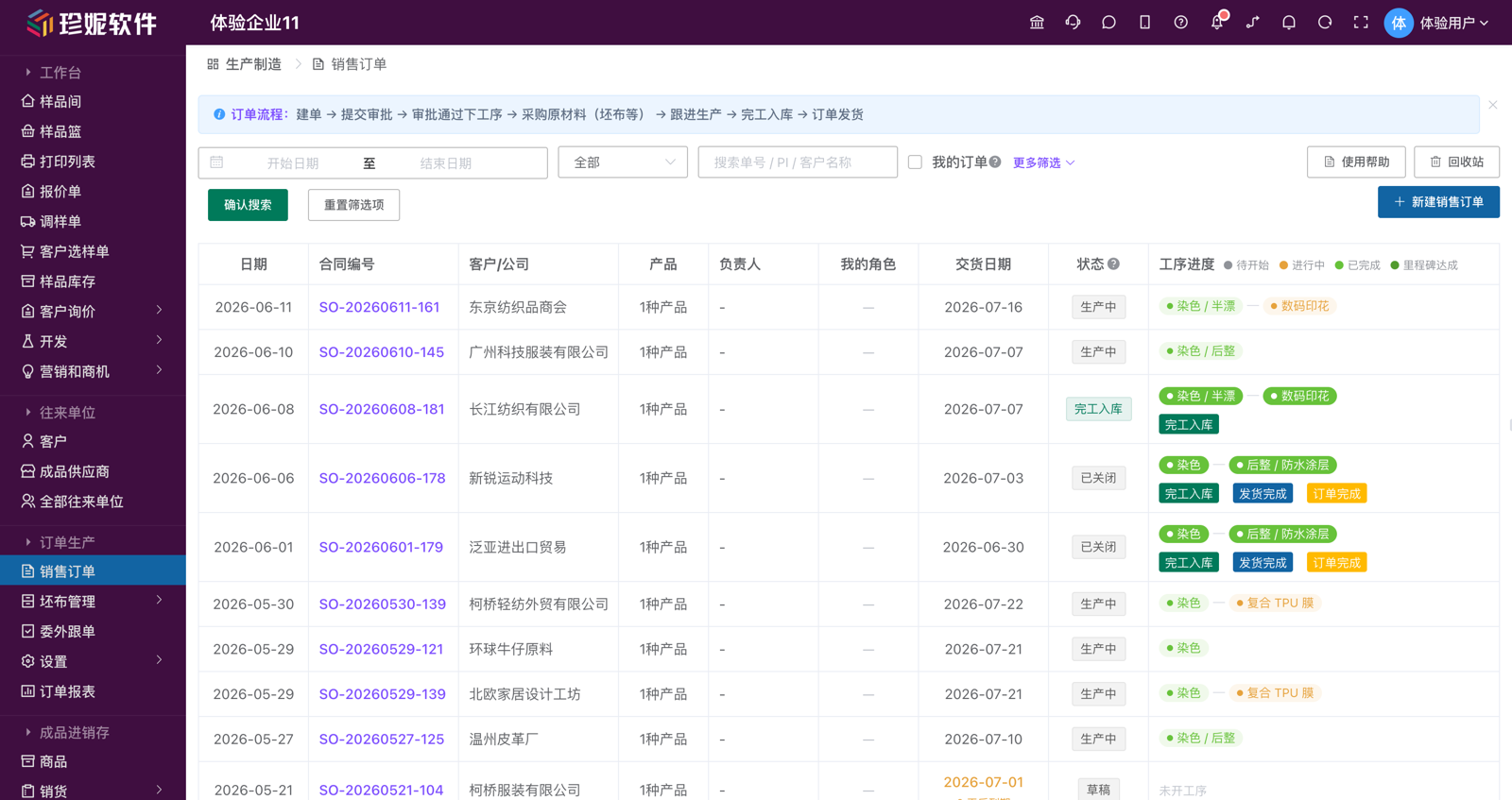
Sales Orders is the main entry, while the production workbench collects pending work.The order number links purchasing, processes, stock-in, and shipment, with progress available for review.
Order Production is a pure-outsourcing order tracking platform for the textile industry. Its greatest value isn't the number of features — it's that it cures, once and for all, the three biggest pain points in the fabric business: struggling to find where to do things, not knowing how far an order has progressed, and disputes over processing fees.
Who this is for
Fabric traders who do outsourced processing — you don't run your own workshop, but you send greige out to dye houses / finishing mills / printing mills / sampling houses for processing, then track progress, reconcile accounts, and stock-in for delivery. If you're a factory with your own workshop, the work-dispatch / work-report submodules also work, but the module is more focused on the outsourcing scenario overall. See Who This Module Suits at the end for the full breakdown.
Three Core Experiences
1. Review the whole order, then work from focused modules
Open the detail page of a sales order: at the top is the order's basic information + a profit card, and below is the complete execution timeline. Use it to review the whole order; frequent purchasing, material, outsourcing, completion, and shipment work can also be handled from their focused entries:
- ✅ Edit the order contract / change the delivery date / change the owner / configure each role (sales / tracker / purchasing / warehouse / finance)
- ✅ Add an outsourcing process node → create an outsourcing order (dyeing / printing / finishing / sampling…)
- ✅ Issue greige to the dye house → chain processes together step by step
- ✅ View material issue / return / shrinkage / processing fee details for each process
- ✅ Let the tracker add on-site tracking records and upload on-site photo / video evidence
- ✅ Record processing fees and shipping / entertainment / material costs
- ✅ Export contracts / outsourcing instruction sheets in one click using your own Excel templates
- ✅ Finished-goods arrival → completion stock-in (roll details) → initiate a shipping task
These entries stay linked by the order number and source document. Sales staff can review the full order from Sales Orders, while each operational role can go directly to its own work area.
2. The Progress Timeline Is Clear at a Glance
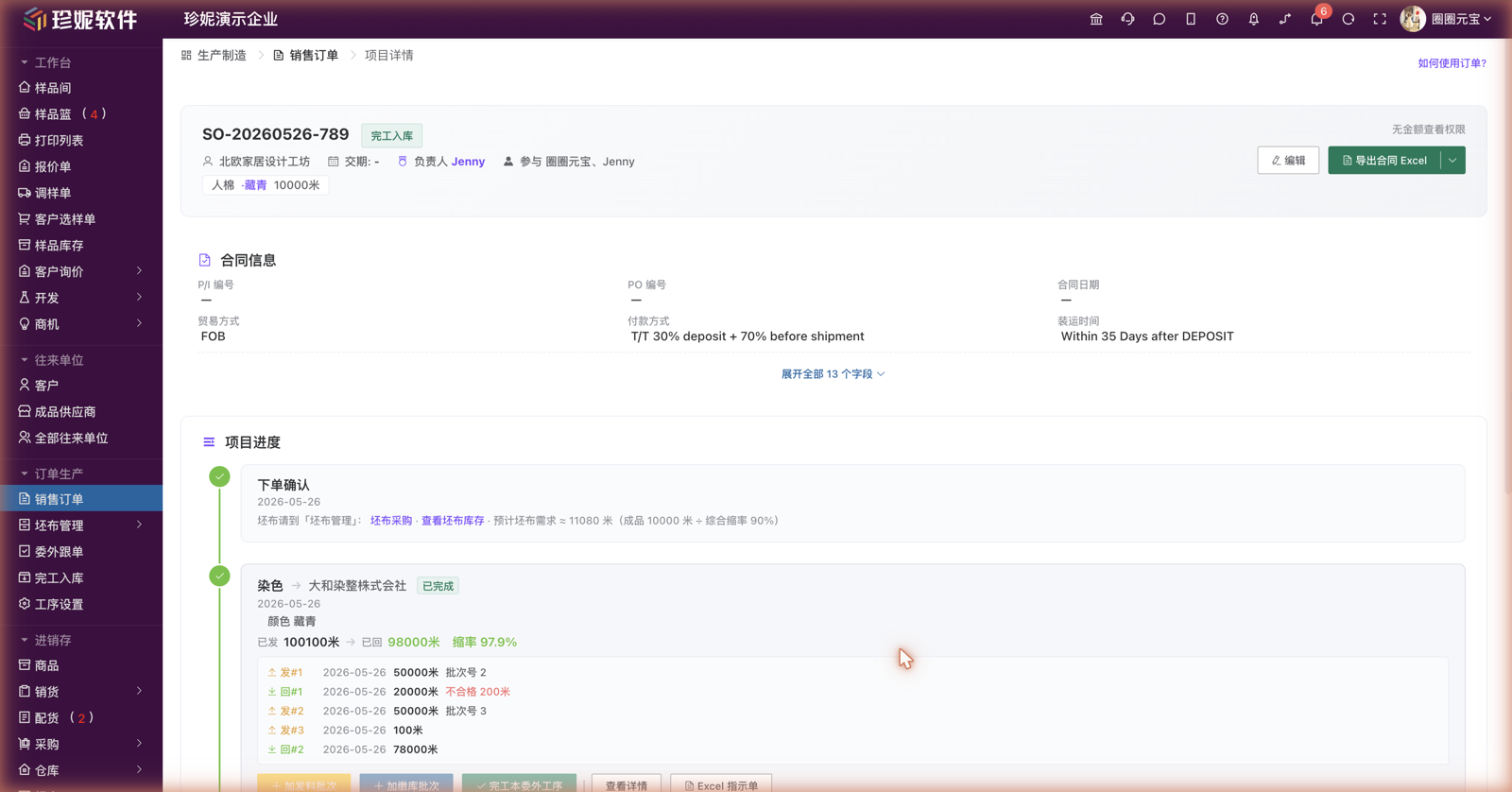
The "Overview" tab of the order detail has a vertical project timeline, running from order placement all the way to completion, with one node per outsourcing process:
Order confirmed → Dyeing (Dye House XX) → Printing (Mill YY) → Finished-goods arrival → Completion stock-in → Initiate shipping task → Complete order
  ✅                ✅ completed             🔄 in progress        ⏳ awaiting arrival      ⏳                    ⏳                       ⏳
Each node is labeled with its current status + time + key data (how much was issued, how much came back, the shrinkage rate, and which product and color it concerns), and the operations available at that node are placed right on the node (issue greige, outsourcing stock-in, complete this process, export instruction sheet Excel…). A boss can tell at a glance where the order stands, where it's stuck, and who needs chasing.
3. Costs Tracked Down to Each Individual Payment
The outsourcing order and order detail pin every payment to its source:
| Cost type | Linked to | Example |
|---|---|---|
| Processing fee | Specific process + specific batch | Dyeing batch 1, 990 m × ¥5/m = ¥4,950 |
| Shipping / logistics, express | Specific batch / outsourcing order | Batch 1 freight from greige warehouse to dye house ¥200 |
| Entertainment expense | Specific batch / outsourcing order | Entertainment at the dye house during tracking ¥560 |
| Greige purchase cost / materials & accessories | Process / outsourcing order | Dyes & auxiliaries ¥1,500 |
| Sampling fee | Process / outsourcing order | Printing plate setup fee ¥1,500 |
| Other | Specific batch | Batch 2 out-of-spec shrinkage compensation ¥800 |
Every cost is precise to a specific batch and time — not a vague lump sum like "the dye house cost us X tens of thousands." Each cost line can carry an uploaded invoice / transfer receipt image as evidence. Outsourcing processing fees formally enter financial payables, and a payment order can tick the outsourcing orders directly to offset them (see "Outsourcing Management" below).
This is real-world business precision
Margins in the fabric trade are thin, batches are numerous, and disputes are common. A vague "roughly how much" quietly eats into your margin. The system pins every payment to a specific batch with concrete evidence (on-site photos / invoices), so when a dispute arises everything is laid out plainly.
The Whole Workflow in One Sentence
Customer places order → issue greige to dye house → dyeing → finishing → printing… → tracking / progress / processing fees → finished-goods arrival → completion stock-in (roll details) → initiate shipping task → warehouse stock-out (receivables enter finance) → complete order
Sales order (order number / style number / each role: sales / tracker / purchasing / warehouse / finance)
  ↓
Greige issue (linked to greige inventory with auto quantity validation, or type a batch number by hand with no inventory deduction)
  ↓
Outsourcing processes (chained one by one: dyeing / printing / finishing…, by process)
  ├─ Batch 1 material issue / batch 1 stock-in
  ├─ Batch 2 material issue / batch 2 stock-in
  └─ …shrinkage / loss calculated automatically; processing fee totaled by stock-in quantity × unit price, into payables
       └─ Check "return material and transfer to next process" to have the mill ship directly downstream
  ↓
Finished-goods arrival (register quantity + upload roll-detail sheet)
  ↓
Completion stock-in (detailed yardList: roll number / color / yardage / spec, can import the inspection machine's Excel roll details)
  ↓
Initiate shipping task → warehouse picks roll numbers and pieces for stock-out → receivables enter finance, inventory deducted
  ↓
Complete order
Module Menu Overview
The menus under the "Production orders" group in the sidebar (top to bottom) have been substantially slimmed down — the frequently-used ones stay in the main menu, and the settings ones are all tucked into a "Settings" flyout:
| Menu | Submenu (flyout on hover) | Purpose |
|---|---|---|
| Sales orders | (single page) | Enter customer contracts, contract templates, style-number management (used most by customers, listed first) |
| Production workbench | (single page) | Summarizes pending items for the current user's assigned roles; Sales Orders remains the main entry |
| Greige management (flyout) | Greige products / greige purchasing / goods arrival / greige inventory / greige return / purchasing plan | Full greige lifecycle + material-prep purchasing |
| Yarn management (flyout) | Yarn products / yarn purchasing / goods arrival / yarn inventory / yarn issue / yarn return | Available when yarn weaving is enabled; manages yarn purchasing, inventory, issue, and return |
| Order tracking | (single page) | The tracker's main battlefield: a single unified entry for all outsourcing orders |
| Settings (flyout) | Contract template settings / process settings / greige template settings / inspection & packaging settings / shipping template settings / business data | All template and parameter configuration, plus the business-data dashboard entry |
| Approvals | (single page) | Orders / outsourcing orders awaiting my approval, etc. (visible only to those with the collaboration module enabled + "Approval" permission) |
| Order reports | (single page) | The dedicated report center for production orders, see Reports |
Menu design: surface the frequent, tuck away the settings
- "Completion stock-in," "process settings," and "business data" are no longer separate menu items: completion stock-in is done right in the order detail (no need for a dedicated entry); process settings, contract template settings, greige template settings, inspection & packaging settings, shipping template settings, business data, etc. are all tucked into the "Settings" flyout — hover over "Settings" and it pops out, and any new settings items added later hang here too, so the main menu no longer keeps growing longer.
- The tracker's main battlefield is the outsourcing order master list under "Order tracking", with filters by process / status / processing mill. One list to see everything — no more switching back and forth between separate dye-house / finishing / printing / sampling modules.
- Goods arrival is the warehouse's receiving entry: greige purchase orders are initiated by the buyer (the order-placing task), and arrivals are confirmed and recorded by the warehouse under "Goods arrival" — two separate things.
- Approvals appears only when the collaboration module is enabled and the current account has "Approval" permission; business data is visible only to the company owner (or authorized employees) by default.
- Delivery alerts don't get their own menu item — instead they're pushed down inline into the order list / outsourcing list / detail pages (red / orange / green + "N days overdue / due in N days" text), so they remind you right where you're looking.
Inspection is now handled as a kind of "process" and is no longer a standalone top-level menu; instruction sheets are also no longer a separate menu — they're exported using your own Excel template from the outsourcing process node / outsourcing order detail.
1. Business Data Dashboard (formerly Production Board)
The "Business data" entry in the "Settings" flyout of Order Production opens the full-screen "Business Data Dashboard" in a new tab — an upgrade of the former "Production Board," now open to all companies, and well suited for a wall-mounted TV or projection at the morning meeting:
- 📊 Key metrics: orders in progress / outsourcing in transit / delivery alerts, plus three cash cards — receivables, payables (including outsourcing processing fees), and account balances
- 💰 Gross margin and business analysis use the same calculation, so the dashboard and your reports always agree
- 🗺️ Sales flow map: configure shipping provinces in the settings drawer behind the gear icon at the top right
- 🔐 Permissions: visible only to the company owner by default; you can authorize specific employees under "System Settings → Order Production Settings" — unauthorized employees won't see the entry at all
Pure-inventory companies automatically hide production-type metrics, undisturbed. For the full dashboard guide, see Reports.
Design philosophy
It's not "click here to see whatever data you want," it's "here are the few things that need your attention." Scan it in one glance at the morning meeting.
2. Sales Orders
Who uses it: salespeople + order owners
Creating an Order
Go to Order Production → Sales orders and click "New order" at the top right. Fill in basic information such as order date / order number / customer / style number / delivery date / our company header, with optional attachments (contract PDF / color sample images). The order-creation page has been polished for "quick order entry":
- "Order date" and "order number" (formerly "document date" and "contract number" — renamed in June for the order context): leave the order number blank to auto-generate, or type it in by hand
- Customer supports quick-add: when the customer can't be found, you can create a customer + multiple contacts right on the same screen from the search box, without first jumping to the address book to set it up and coming back — consistent with quotations / sample adjustment
- Our company header (renamed from the old "seller header"): a dropdown of presets (multiple company headers / different headers for export vs. domestic), pick from the dropdown or type a new value, with "Manage" on the right to maintain presets; it sits right below the customer field; reference it in an Excel contract template with
{{我方抬头}}(our company header) — the old{{卖方抬头}}placeholder has been retired, so any template still using the old name needs to switch to the new one - Proforma invoice (PI): the proforma invoice number (PI No.) for export orders, filled at order creation and optional; domestic / non-export customers can ignore it; reference it on the detail page and in Excel templates with
{{形式发票}}or{{PI}} - Currency / trade terms / exchange rate (for export): defaults to base currency CNY; once you pick a foreign currency and enter a rate, the contract amount is converted to RMB at that rate for gross-margin calculation, while CNY orders show no rate field at all — zero distraction
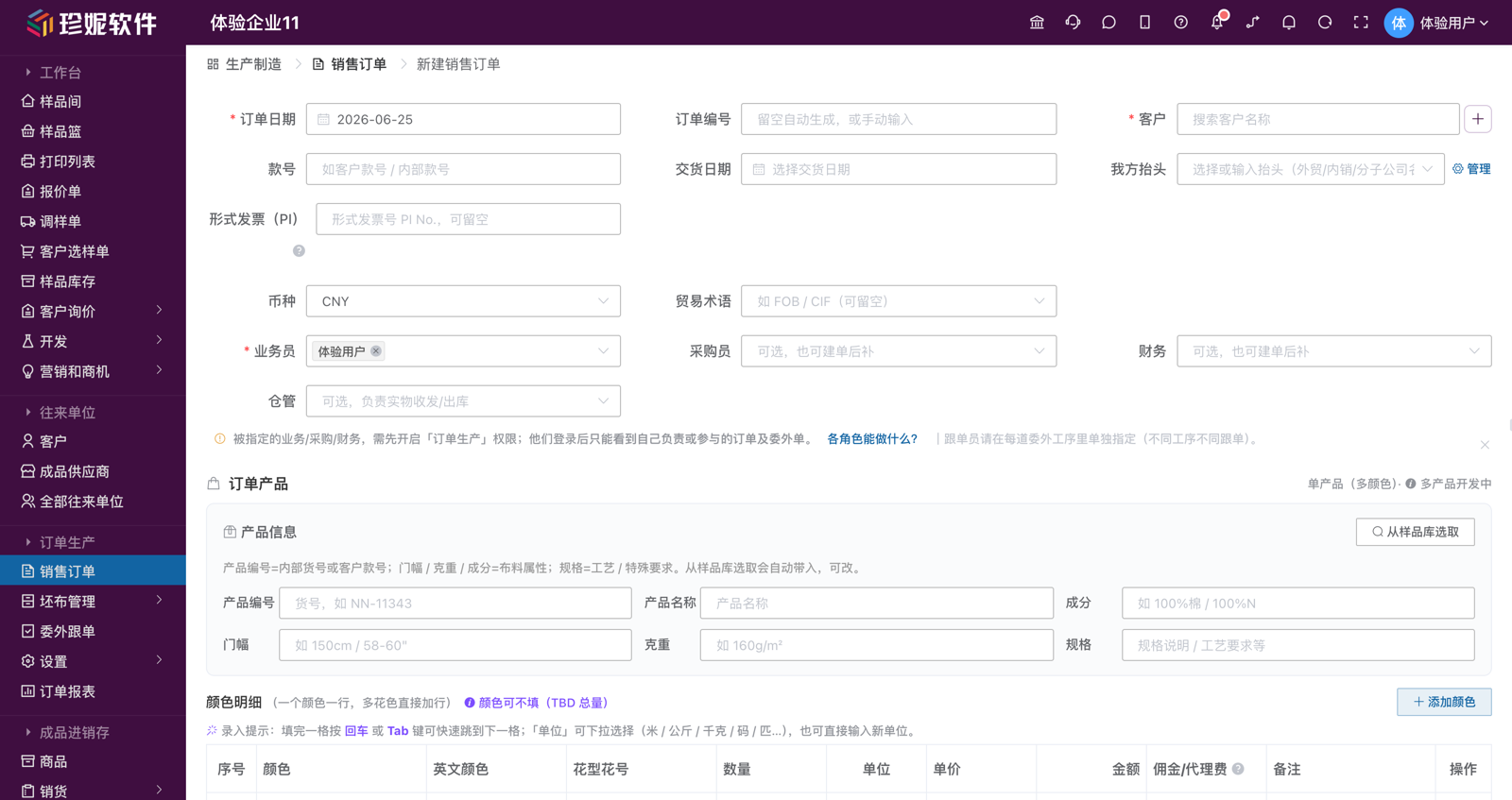
Product info + color details (single product, multiple colors):
- Product info focuses on six common fields: code / name / composition / width / weight / spec (add any other personalized fields under "More contract info"). Click "Pick from sample library" to bring in a sample's code, composition / width / weight / spec, and all of its colors
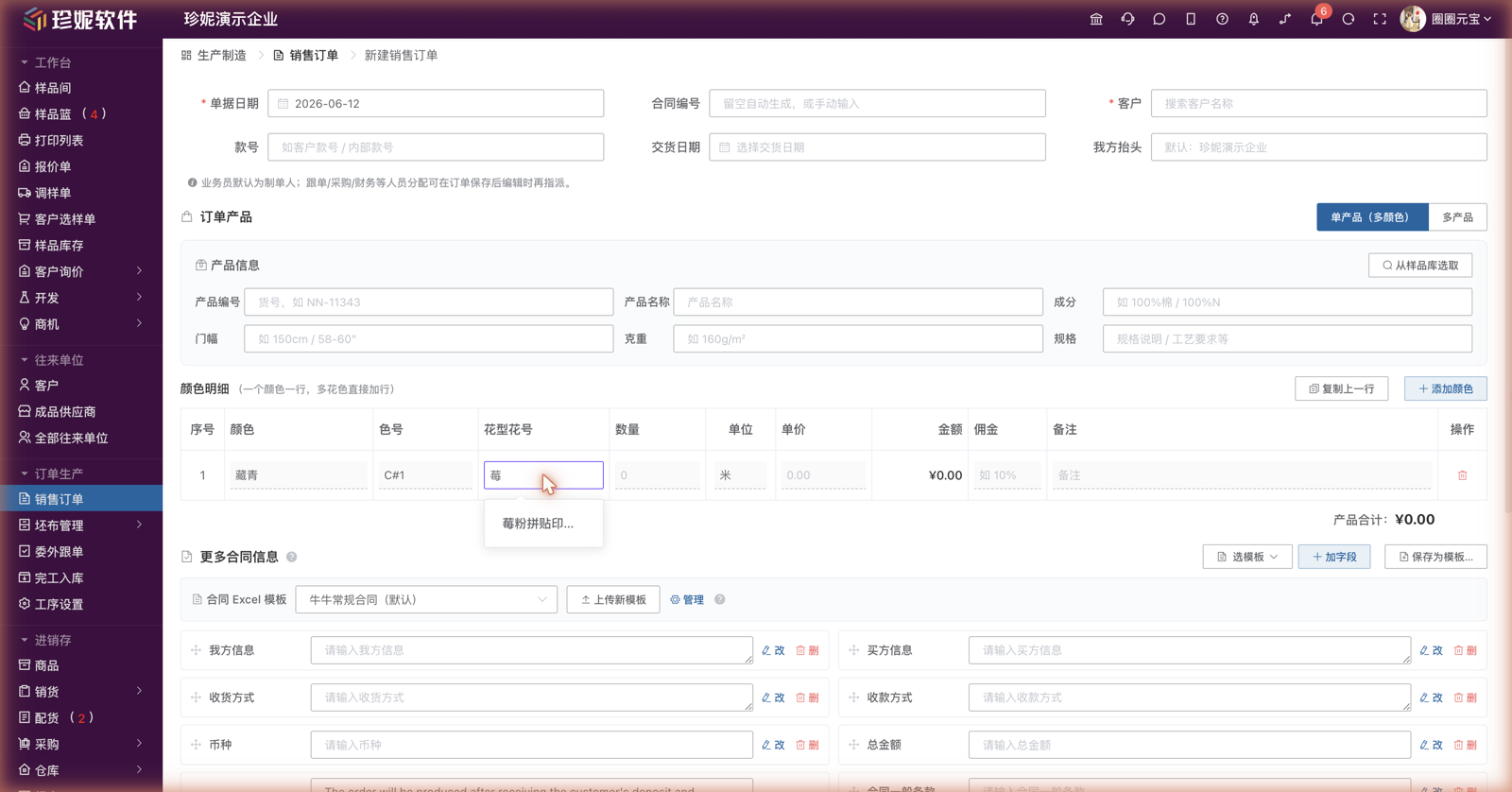
- Color details, one color per row: for sample-sourced products, the color column is a dropdown of the sample's colors — type a new color and press Enter to add it on the fly; for non-sample products, just type it in. Each row can carry color / English color (optional) / pattern & number / quantity / unit / unit price / commission / notes; "unit" is a dropdown (meter / kg / kilogram / yard / bolt…) and also accepts a typed new value; after filling a cell, press Enter / Tab to jump to the next
- The pattern & number column can be typed in directly, and as you type it autocompletes from the Pattern Library (suggestions appear as "pattern name + number" combos; selecting one fills it back in), and it carries into the Excel export automatically (detail-row placeholder
{{产品.花型花号}}) - Color can be left blank for now: when the contract only fixes the total quantity with colors to be determined (the industry calls it TBD), just leave the color blank and fill in only the total quantity — split out the specific colors later when adding processes / instruction sheets
Multi-product (multi-SPU) orders
New orders are currently "single product (single style) + multiple colors"; the feature for putting multiple different products (multi-SPU) on one order is still in development (the order-creation page shows a "multi-product in development" hint). Existing multi-product orders / legacy data orders can still be edited normally — the system auto-groups them into multiple product cards by product; the "process progress" column in the order list and the timeline on the order detail also display grouped by product (one independent process timeline per product).
Bottom buttons: with approval off, clicking "Save" takes effect immediately; with approval on, it's "Save" (save as draft) + "Submit for approval".
Contract Field Configuration ("More contract info")
Contract fields vary widely from company to company — export trade, domestic sales, and different customers all differ. The system provides a set of template-driven contract fields in the "More contract info" section of the sales order — it presets 7 contract field templates (3 export + 4 domestic) as a starting point. When creating an order, apply one template, then add fields / edit fields / drag to reorder on top of it, and fine-tune for the current order.
Field types support single-line text / long text / number / date / single-select dropdown. Dropdown fields come with common candidate values built into the templates (e.g. trade mode FOB / CIF / CFR / EXW, currency USD / EUR / CNY / GBP / JPY / HKD, payment method T/T 30%+70% / L/C at sight, etc.) for direct selection when creating an order; manual entry of new values is also supported.
How to use: at order creation just "select a template," build templates in the settings page
- When creating an order, click "Select template" in the "More contract info" section to apply a preset (or a company template saved in the settings page) → the field set and default values are brought in automatically, and you can continue to "add field", "edit / delete", and "drag to reorder"; fields lay out two per row — compact and easy to fill; the current order's temporary changes do not affect the template itself
- Building templates / setting default values / setting as default / binding Excel are all done on the dedicated "Contract template settings" page (Order Production → "Settings" flyout → contract template settings). This is the June redesign — the order-creation page no longer has "save as a template," to avoid bleeding this order's filled values into the template; template work is done once in the settings page and shared across the whole company
- Set as default, and new orders apply that template automatically, with field default values (e.g. payment method) pre-filled — order creation basically comes down to changing the numbers
- Contract Excel template row: at the very top of "More contract info" there's a "Contract Excel template" selector bar where you can temporarily swap in a different export Excel for this order (selecting "Select template" brings out the one it's bound to automatically), or jump to the settings page to upload / manage
- Auto-collapse on the detail page: when an order has more than 6 contract fields, the detail page shows only the first 6 by default, with an "Expand all N fields" button — contract-heavy orders no longer stretch the page
- Out of the box for new companies: the first time a newly registered company opens the contract template list with no templates yet, the system seeds a set of preset contract templates automatically — no building from scratch
- Templates are shared at the company level, and an order saves a snapshot of the field definitions (editing a template afterward does not affect orders already created)
- All of these fields can be referenced in an Excel contract template with
{{字段名}}(field name) placeholders — see Sales Order Contract Fields
Style Number
An order-level styleNumber field (e.g. AW2026-001 / SS2026-042 / 2026-Spring/Summer-Silk-001). The bottom of the "Product / Style number" column in the order list shows the deduplicated set of style numbers, making seasonal categorization and batch queries easy.
Order Roles (One Crew per Order)
Each order can be staffed with its own dedicated crew — these are "roles within this order," not company roles. You can assign them right in the form at order creation:
| Role | Who | Where to assign | What they can do | Can see amounts? |
|---|---|---|---|---|
| Owner | 1 person (defaults to the creator) | Auto-set to the creator at creation, changeable when editing | Full authority over this order: edit the order, add processes, issue/stock-in material, completion stock-in, initiate shipping, see all amounts, see every role tab | ✅ All |
| Salesperson | 1 or more (required, defaults to the creator) | The creation form | Operates on "Overview": advance order progress, initiate shipping tasks, view shipping orders / receivables / deposits | ✅ All |
| Tracker | Designated per process | Assigned individually in each outsourcing process (different processes, different trackers) | On the "Tracker" tab: view the outsourcing orders they're responsible for, add on-site tracking records (text / on-site photos / video) | ❌ Cannot see amounts |
| Buyer | Optional, multiple | The creation form (or added after creation) | On the "Buyer" tab: view this order's greige / finished-goods purchase orders (including arrival status), add costs | 🟡 Purchase price only |
| Warehouse | Optional, multiple | The creation form (or added after creation) | On the "Warehouse" tab: greige arrival, finished-goods arrival, completion stock-in, execute shipping (pick roll numbers and pieces for stock-out) | ❌ Cannot see amounts |
| Finance | Optional, multiple | The creation form (or added after creation) | On the "Finance" tab: this order's payables list, offset processing fees / receipts & payments, gross-margin stats | ✅ All |
Assigned people must first enable the "Order Production" permission under "Roles"; after logging in, they see only the orders and outsourcing orders they own or participate in. Assign trackers individually in each outsourcing process.
Trackers / warehouse can't see amounts
Trackers (on-site staff) and warehouse staff see only progress and quantities, not amounts — unit price, processing fee, contract amount, gross margin and other monetary fields simply aren't shown (hidden by permission). This lets external trackers / temporary staff participate in tracking without leaking commercial information. The owner / sales / finance see everything; the buyer sees only purchase prices.
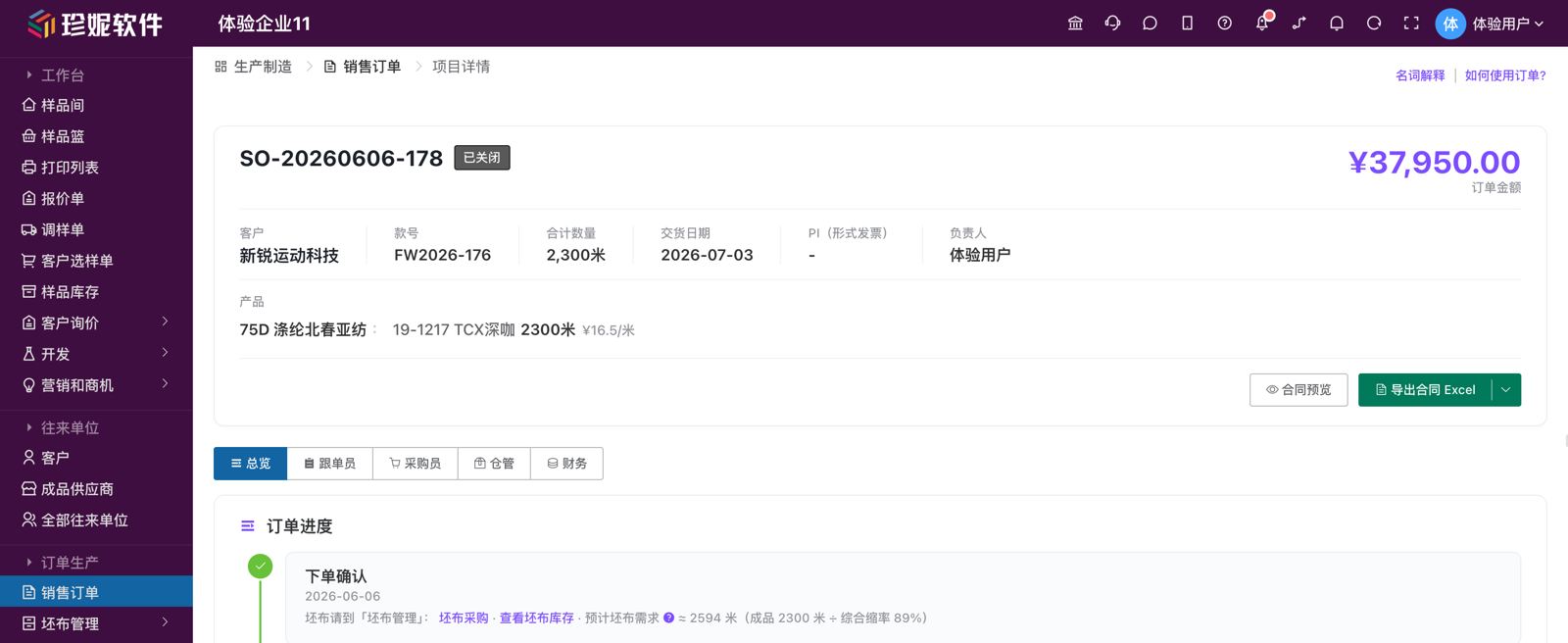
The Order Detail's "Per-Role Tabs" (Each Sees Their Own)
The top of the order detail page has a row of role tabs (a segmented control); each role clicks their own tab to see only what's relevant to them, without being drowned in unrelated information:
| Tab | What you see / what you can do here |
|---|---|
| Overview | The complete order progress timeline + shipping orders + order receivables + deposit collection (the salesperson mostly operates here) |
| Tracker | The outsourcing orders / finished-goods arrivals / completion stock-ins / inspection & packaging / rework this person is responsible for; pick an outsourcing order to add on-site tracking records |
| Buyer | This order's greige purchase orders (arrival status) + finished-goods purchase orders + payables line by line |
| Warehouse | Greige arrival / finished-goods arrival / completion stock-in / shipping (execute stock-out) |
| Finance | This order's receivables line by line / payables line by line / deposits / gross margin / misc. costs |
When you switch to a non-"Overview" tab, the documents relevant to that role are listed below, and clicking a row opens that document's read-only detail; switch back to "Overview" for the complete order progress. Tabs are mutually exclusive in visibility — except for the order owner, who can see every tab, everyone else sees only "Overview" + their own role's tab; amounts are still hidden by the rules above.
If role assignment has been authorized separately, a supervisor or scheduler can adjust the order owner and collaborators without having full order-edit permission. The assignment entry changes people only; it does not change amounts, products, status, or notes.
List Filter: "My Orders"
When a tracker opens the list, the "My orders" filter is on by default (orders they own or collaborate on), so they aren't swamped by irrelevant orders. Click to switch to see all.
Status Flow
| Status | Trigger |
|---|---|
| Draft | Just created (when approval is enabled) |
| Approved | Saved and confirmed / approval passed |
| In production | Outsourcing has been dispatched |
| Completion stock-in | Stock-in done, awaiting shipping wrap-up |
| Completed | Wrap-up finished (usually closed manually) |
| Closed | Manually closed (order cancellation, etc.) |
Order Receivables · Deposit (Two Receivables Kept Apart)
The order detail has an "Order receivables · Deposit" card area (shown on the "Overview" and "Finance" tabs) that keeps the expected and the on-the-books receivables separate, so you can both chase payment and avoid inflating the books:
| Card | Meaning |
|---|---|
| Expected receivable (contract amount) | Order unit price × order quantity, exists the moment the order is signed, used as the basis for chasing payment / collecting a deposit; does not enter the customer's on-the-books receivables |
| Shipped receivable (on the books) | Cumulative shipped (order shipping) amount, entering the customer's on-the-books receivables line by line |
| Outstanding (on the books) | Shipped receivable − received; flagged red when outstanding is greater than 0 |
| Deposit (receivable) / deposit received | How much deposit this order agreed to collect and how much was actually received, with "Set / Edit" on the card |
The benefit: the moment an order is signed you can see "roughly how much this order can bring in (expected receivable)," but what the customer owes you on the books arises only with actual shipping, line by line (shipped receivable) — goods not yet shipped don't get booked as customer debt early, making reconciliation more accurate. Amounts are hidden by permission: for those without amount permission (trackers / warehouse), these cards show no amounts.
The deposits and progress payments your customer pays also have a place to be recorded:
- Link receipts to the contract: the receipt order has a new "link to production order contract" offset section (visible to companies with production orders enabled) — a receipt can be attached directly to a contract, and the contract's received deposit accumulates automatically
- Visible on the order: right on the "Deposit (receivable) / deposit received" card above, you can see at a glance how much deposit this order has collected
Advance-balance rules unchanged
A deposit attached to a contract still counts toward the customer's advance balance until it is offset against receivables — the customer's statement net amount won't be wrongly deducted.
Project Progress Timeline (Overview Tab)
The "Overview" tab of the order detail has a vertical project timeline, running from order placement all the way to completion, with the operations available at each node placed right on the node, so new employees can follow it down without memorizing the entire process. For multi-product orders, the outsourcing process nodes are grouped by product (each group headed by a "Product: XX" title line).
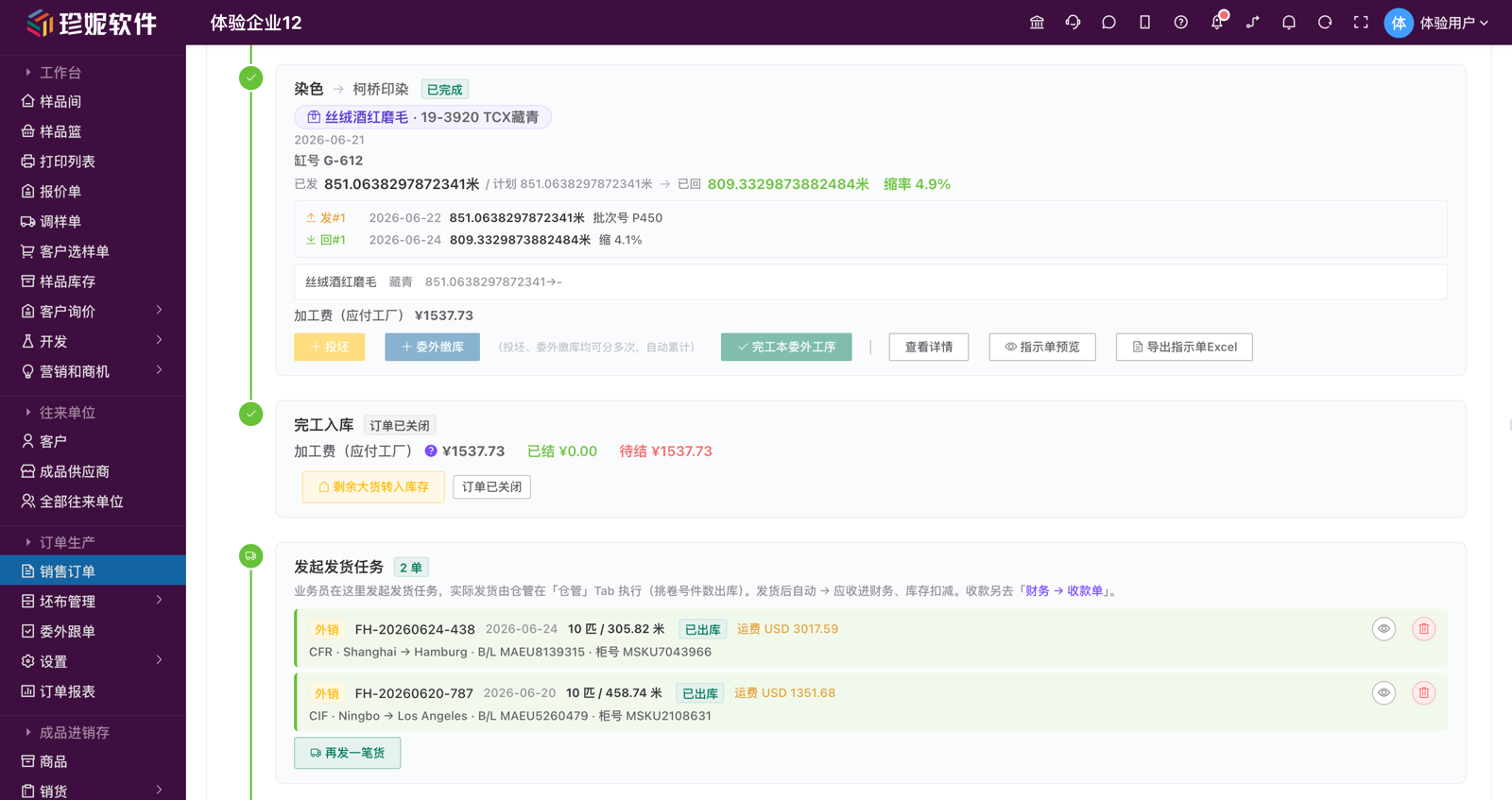
| Node | What you can do at this node |
|---|---|
| Order confirmation | Shows greige purchasing guidance; a line of gray text below shows the estimated greige requirement ≈ X m (auto-estimated from order quantity ÷ overall shrinkage), plus this order's greige already purchased / already arrived status; before the first process there's a "dyeing / printing" quick-create suggestion |
| Outsourcing process node (one per process) | Issue greige / outsourced material issue (multiple times, auto-totaled), outsourcing stock-in (multiple times, auto-totaled), complete this outsourcing process, view details, instruction sheet preview, export instruction sheet Excel, delete this process; the node directly shows which product and which color it concerns + issued → returned + shrinkage |
| Add next outsourcing process | Does not require the previous process to have stocked in — you can lay out every process before work starts, then work through them one by one at the actual pace; processes can no longer be added once finished-goods arrival has been registered |
| Finished-goods arrival | When the last process is done and goods come back, register finished-goods arrival (quantity + upload roll-detail sheet Excel / image), with multiple arrivals, editable / deletable |
| Completion stock-in | As long as any process has stocked in you can click "Completion stock-in" (partial completion asks for a second confirmation, see §8 below); after completion stock-in you can still "transfer remaining bulk to inventory" |
| Initiate shipping task | After completion stock-in, the salesperson initiates a shipping task here, and the actual stock-out is executed by the warehouse on the "Warehouse" tab (picking roll numbers and pieces); after shipping → receivables enter finance automatically, inventory is deducted |
| Complete order | After completion stock-in, the user manually clicks "Complete order" to wrap up (goes through approval if enabled); a completed order can be "un-completed" |
Who can operate on the timeline
The timeline's operation permissions are split finely: adding processes / issuing & stocking-in material is for the owner + sales + tracker; initiating shipping tasks is only for the owner + sales; completion stock-in / finished-goods arrival / executing shipping — these physical receipt/dispatch actions belong to the warehouse (or can be done by the owner on their behalf). When you can't see an operation button, a line of gray text reads "this operation is done by XX on the XX tab."
3. Greige Management
A fabric trader's core material is greige. The system breaks greige management into its own section:
Greige Products
Enter the basic information for each greige item. The form has been slimmed down for the greige scenario, with fields in this order: code / name / composition / width / weight / spec (warp & weft density) / lot number / main unit / greige supplier / supplier's code / supplier's name / notes — fields greige doesn't need (category, dye-vat number, secondary unit, conversion ratio, unit price, etc.) have been removed for a cleaner form; existing data is unaffected.
Greige Purchasing / Goods Arrival / Return
Greige purchasing reuses the purchase order engine from inventory (the URL carries productType=greige to enter greige mode), follows the standard purchasing workflow, and automatically links to greige inventory. In the "Greige management" flyout:
- Greige purchasing: the buyer places orders (the purchasing task); row actions keep only "Edit" and "Delete"
- Goods arrival: greige arrival is confirmed and recorded here by the warehouse — purchasing (placing the order) and arrival (receiving) are two separate things done by two people; each arrival can be recorded as its own batch with this batch's quantity and piece count, and you can also see this order's greige arrived / awaiting-arrival status on the "Warehouse" tab of the order detail
- Greige return: goes through inventory's purchase return order
For batched arrivals, each receipt leaves its own batch record. The purchase quantity remains the plan quantity; actual arrivals may come in multiple batches, arrive short, or be marked as the final batch. If the purchase should settle by real receipts, enable "settle by actual arrived quantity" on the purchase order; payables and unpaid amounts then follow the cumulative arrived value. If it is not enabled, settlement still follows the planned purchase amount.
Greige Inventory
Query in real time each greige item's remaining quantity, committed quantity (assigned to outsourcing but not yet issued), and available quantity.
Issuing to the Dye House (Through the Outsourcing Process)
Issuing greige to the dye house no longer has its own standalone "greige issue stock-out" menu — greige issue / return always goes through the outsourcing process: issue = add a material-issue batch on the outsourcing process node; return / under-issue = delete or edit the issue batch. This way greige inventory has only this one outlet through the outsourcing process, with no duplicate ledger entries against generic material stock-in/out.
- On the outsourcing process node of the order detail timeline, click "Issue greige / outsourced material issue" to issue greige in multiple batches; the system records by batch and validates the quantity automatically (when picking greige inventory, it can't exceed inventory)
- Material can be issued even when greige isn't in system inventory: the issue dialog offers two paths — pick greige inventory (auto-deducted), or type a batch number by hand (no deduction); you're not forced to enter greige into inventory first
- Greige inventory is deducted immediately upon stock-out, leaving a complete transaction record for later reconciliation
Mill ships directly to the next process
Sometimes a dye house finishes and ships directly downstream (to a finishing mill) without returning to your own warehouse. On stock-in, you can check "return material and transfer to next process" — the goods are transferred directly to the next process's outsourcing order, saving one stock-in + stock-out cycle. If you need an "outsourcing transfer sheet" for the driver / mill to keep on file: its system print entry has been hidden, and this kind of document is planned to switch to generated-Excel output (print it yourself) — let us know if you need it.
4. Outsourcing Management (Core)
The core module of production orders. Everything about "issuing material to a processing mill, tracking progress, receiving finished goods, and reconciling payments" happens here.
Outsourcing Order Status View
View outsourcing orders by status distribution — pending issue / issued (partially issued) / partially stocked-in / fully stocked-in / completed; batches with out-of-spec shrinkage are highlighted.
All Outsourcing Orders
Regardless of dye house / finishing / printing / sampling — a single unified list + category filter.
Filter by date range / processing mill / outsourcing process / settlement status, switch between status tabs at the top, and search by document number / product keyword.
Outsourcing Order Status
| Status | Meaning |
|---|---|
| Pending issue | The outsourcing order is created but no greige has been issued to the processing mill |
| Issued / partially issued | Material has been dispatched (partially issued = some planned quantity remains to be issued) |
| Partially stocked-in | Some batches have returned finished goods, but others haven't yet |
| Fully stocked-in | All batches have stocked in |
| Completed | The tracker confirms completion (after completion, batches are locked — to change issue / stock-in batches, "Undo completion" first, see below; notes and unit price can still be edited directly, and a next process can still be added) |
| Cancelled | The outsourcing order is voided |
Outsourcing Detail (Drawer Style)
Opening an outsourcing order doesn't navigate to a new page — a drawer slides out on the right (about 85% of screen width), with all the information on one screen:
[Drawer header] Outsourcing order number / status / round N              [Undo completion (after completion)] [Edit]
[Basic info] Outsourcing process / mill / issued product / unit price / billing method / quantity
[Process parameters] Process custom fields (by process: dyeing method / light source / shrinkage limit, etc.)
[Material issue / stock-in batch list]
  Batch 1: 2026-04-15 issued 1000m → 2026-04-20 stocked-in 990m (1% shrinkage)
  Batch 2: 2026-04-22 issued 800m  → 2026-04-26 stocked-in 798m (0.25% shrinkage)
  ...
[Processing fees / costs]
  - Processing fee (per meter): 990 × 5 = 4950
  - Shipping ¥200 (linked to batch 1)
  - Entertainment ¥300 (linked to batch 2, evidence images ×2)
[Tracking records / on-site photos / video evidence]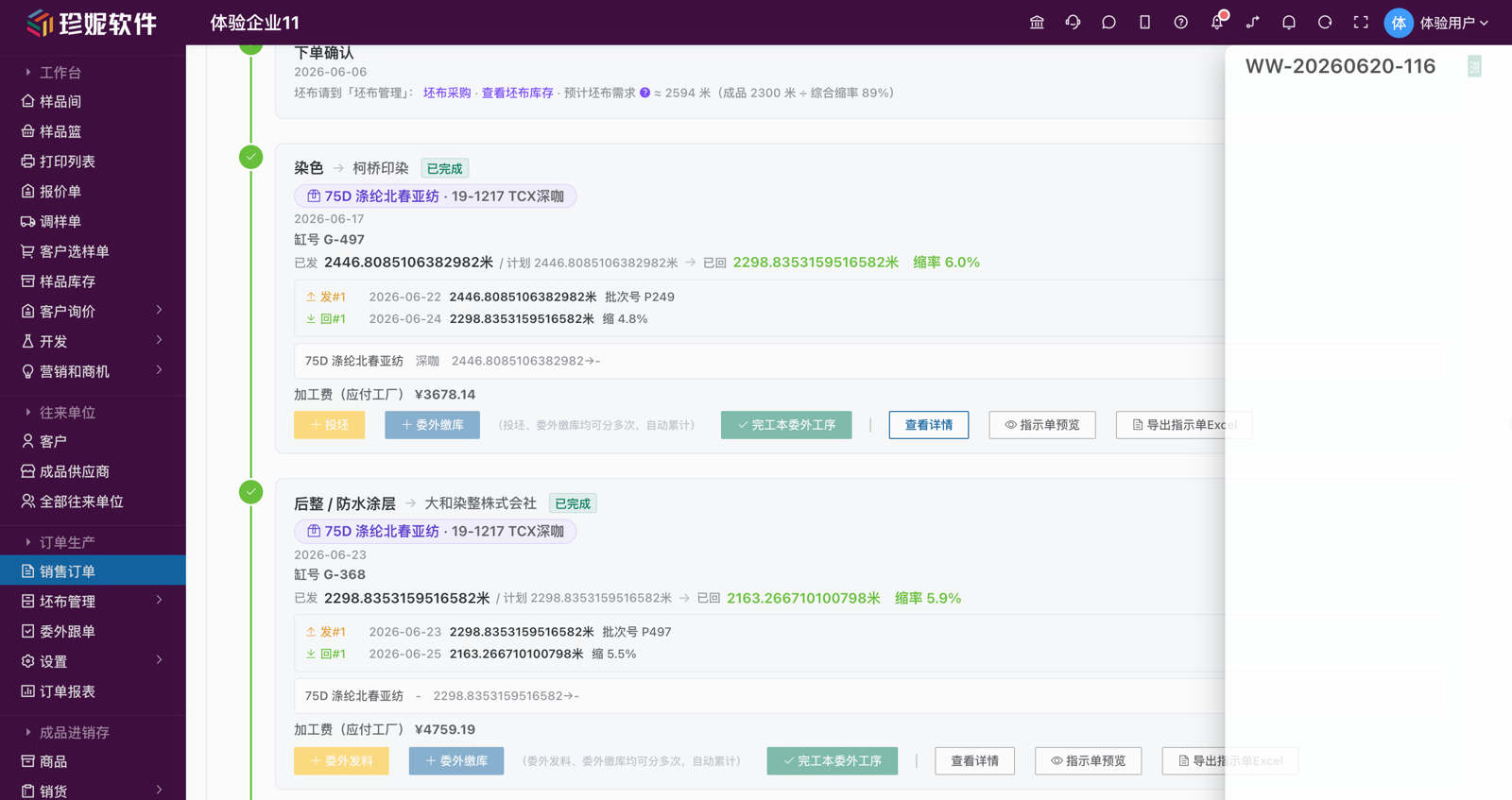
The outsourcing detail drawer is mainly for "viewing": the drawer header keeps only "Edit" (and "Undo completion" after completion). Issuing material / stock-in / completion / adding the next process, as well as exporting the instruction sheet Excel, are all done on the outsourcing process node of the order detail (to avoid a double entry point); tracking records are added on the "Tracker" tab.
The expected return / delivery date carries warning colors: overdue red / within 7 days orange / due + text label.
Batched Material Issue / Stock-In Model
One outsourcing order → N batch records, matching the everyday reality of "one order dyed in separate vats and returned in batches by the dye house":
| Field | Description |
|---|---|
| Batch number | Auto-generated |
| Issue quantity / time | How much greige was issued in this batch, and when |
| Stock-in quantity / time | How much finished goods came back in this batch, and when |
| Shrinkage | Auto-calculated as (issued − returned) / issued |
| Per-batch processing fee | Billed by this batch's quantity |
| Linked misc. costs | This batch's dyes / entertainment / sundry costs |
| On-site photos / video | This batch's on-site evidence |
Each batch is independently visible and settled. After completion, the system automatically computes total shrinkage, total processing fees, and total misc. costs.
Material issue doesn't force a greige inventory pick: choose greige (deducts inventory) or type a batch number by hand (no deduction) — material can still be issued when the greige was never entered into system inventory.
Undo Completion & Batch Locking
To keep completed data from being quietly altered, once a process is completed its issue / stock-in batches are locked — batches can no longer be added or removed directly (text such as notes, and the unit price, can still be edited after completion). To change batches, click "Undo completion" on the process first:
- After undoing, you can edit the issue / stock-in batches; the system automatically recalculates shrinkage, totals, scrap remainders, and the paid amount, and reverses the related financial offsets — just re-complete the process when you're done
- Undo is not allowed once the next process has issued material — handle downstream first, then come back
- Undo operations are recorded in the order timeline for the audit trail
Processing Fee Payments + Costs
- Processing fee: auto-calculated as the negotiated unit price × stock-in quantity (unit can be meter / kg / bolt / yard, etc.); one-time fees are also supported (plate fee / trial-sample fee / setup fee, etc.)
- Costs: multiple entries can stack, each linked to a specific batch or to the outsourcing order. Common types include:
| Cost type | Applies to |
|---|---|
| Shipping / logistics, express | Freight and express for greige to the dye house / finished goods retrieval |
| Greige purchase cost / materials & accessories | Material costs for greige, dyes, auxiliaries, etc. |
| Sampling fee | Sampling fee, color-revision fee, rush fee |
| Entertainment expense | Cigarettes, gifts, meals, favors and other gray-area costs consolidated into one line |
| Other | Dye surcharges, shrinkage compensation, order-change fees, etc. |
Each cost line supports uploading an evidence image (invoice photo / transfer screenshot / receipt); the table's evidence column shows a first-image thumbnail + a "+N" marker.
The design philosophy behind entertainment expenses
Jenny Software faces the real-world reality of the fabric industry head-on — trackers camping out at dye houses to chase orders is routine, and cigarettes, meals, and small gifts are unavoidable relationship costs.
The system consolidates this kind of gray-area spending into a single "entertainment expense" line — itemized separately, batch-tallyable, so the boss can see true gross margin clearly at year-end — without the old way of splitting "gifts / cigarettes & liquor / meals / favors" into so many categories that filling out the form becomes a chore.
Processing Fees Flow into Payables — Offset Them on Payment Orders
Outsourcing processing fees are now formally part of financial payables, no longer an "off-the-books" tally inside production orders:
- Counted in payables: the payables summary and each processing mill's supplier statistics include the outsourcing orders' unpaid processing fees; the accrual scope is outsourcing orders that are partially stocked-in / fully stocked-in / completed (orders just created or only issued are treated as estimates and not accrued)
- Offset via payment order: for companies with production orders enabled, when creating a payment order you can tick outsourcing orders directly to offset their processing fees — the offset amount writes back to the outsourcing order's paid amount automatically, and voiding the payment order rolls the offset back. Entry: the outsourcing offset section on the create / edit page under "Finance → Payment orders"
- Manual entry still works: the original manual payment-entry option in the outsourcing detail remains as a supplement; the two added together make the total paid
Zero change for pure-inventory users — without production orders enabled, payment orders show no outsourcing offset section.
Independent Outsourcing Approval (Only If Enabled)
An outsourcing order can go through approval on its own, separate from the order's own approval — so a money-spending action like issuing to the dye house can clear a checkpoint first. Once you turn on "Outsourcing order" in the "Approvals" configuration:
- A newly created outsourcing process enters the "Awaiting submission for approval" status, with a yellow bar on the timeline node reading "this outsourcing process has not been submitted for approval; material issue, stock-in, and completion are blocked until approval passes"
- Click "Submit for approval" on the node → "Under review", and once approval passes it becomes "Approved" before material issue / stock-in / completion is unlocked; one not yet submitted can be "withdrawn", edited, and resubmitted
- You cannot add the next process before the previous outsourcing process has passed approval (only blocked when outsourcing approval is on)
- Companies without outsourcing approval enabled use outsourcing orders as before — create and use immediately, entirely unaffected
No Editing After Approval (the Order Itself)
By default the order can no longer be edited directly after approval passes — to modify it, click "Request to re-edit" on the order list row (goes through approval), and once it passes the detail page unlocks editing automatically. Only companies with order approval enabled have this flow; orders without approval can be edited anytime.
Process Custom Fields
Each process (dyeing / finishing / printing / sampling) can have its own dedicated fields:
- Dyeing: dyeing method / light source / customer color number / dye house color number / shrinkage limit / fastness requirement
- Finishing: setting temperature / softener / waterproof grade / pre-shrink rate
- Printing: pattern / card number / number of screens / colors / colorways
- Sampling: sampling type (color sample / bulk sample) / number of re-runs
New processes can also add new custom fields — you're not limited to the presets.
5. Order Tracking (the Tracker's Main Battlefield)
All Outsourcing Orders: One List to See Everything
Click the "Order tracking" sidebar menu and you get all outsourcing orders in one unified list — regardless of dye house / finishing / printing / sampling, filtered by processing mill / outsourcing process / settlement status / date, with status tabs to switch between, plus search by document number / product.
Row actions keep only "View" and "Delete": click "View" to see the outsourcing order detail; material issue / stock-in / initiating inspection / adding the next process / completion are all done on the order detail timeline (the buttons are not duplicated on the list row).
On-Site Tracking Records
On the "Tracker" tab of the order detail, the tracker picks an outsourcing order and adds multiple on-site tracking records: text ("Visited the mill today, dyeing has started…") + tags + on-site photos / video. Each entry carries the operator and time, arranged into a timeline.
On-Site Photo / Video Evidence
Each batch of an outsourcing order can have on-site photos / video uploaded — the tracker photographs at the mill to record the actual dyed color, the shrinkage measurement, defect locations, and the workshop state. If a customer complaint / return / shrinkage dispute later arises, the on-site evidence is the proof.
Processing Fees and Reconciliation
After each outsourcing order is completed, the system automatically totals the processing fee as stock-in quantity × unit price, then adds each batch's shipping / entertainment / material and other costs, forming this processing mill's payable amount on this order; the details can be reviewed line by line on the order detail and the outsourcing detail. Unpaid processing fees flow into the financial payables summary and each mill's supplier statistics; when paying, tick the outsourcing orders on the payment order to offset them (see "Processing Fees Flow into Payables" above).
Delivery Alerts (Reminders Right Where You're Looking)
The system automatically monitors the delivery dates of all orders + all outsourcing orders, without a separate alert menu — instead it shows red / orange / green tags + "N days overdue / due in N days" text right inline in the order list, outsourcing list, and detail pages — ⚠️ orange when due is near, 🚨 red when overdue, ✅ green when normal.
6. Process Instruction Sheets
Instruction sheets are not a standalone menu — each outsourcing process's instruction sheet is exported using your own Excel template, right on the process node of the order detail timeline:
- On the "Overview" timeline of the order detail, find that outsourcing process node and click "Export instruction sheet Excel" ("Instruction sheet preview" next to it lets you take an online look first); the system exports it directly using the template linked to the process (see below for how to bind a template to a process)
- The first time you build a template, go to the dialog for binding a template to a process under "Process settings" and "Download sample template" — the sample file ships with an "instructions" worksheet listing every available field; the fastest path is to reshape it into your own layout
- Replace the cells you want auto-filled with
{{字段名}}(field name) placeholders (they can be mixed with text), write a single row of{{产品.样品编号}}{{产品.发出数量}}… in the detail area (on export, that row is automatically duplicated per detail line, formatting included), save as .xlsx, and upload - From then on, every process is one click of "Export instruction sheet Excel" — the data fills straight into your layout
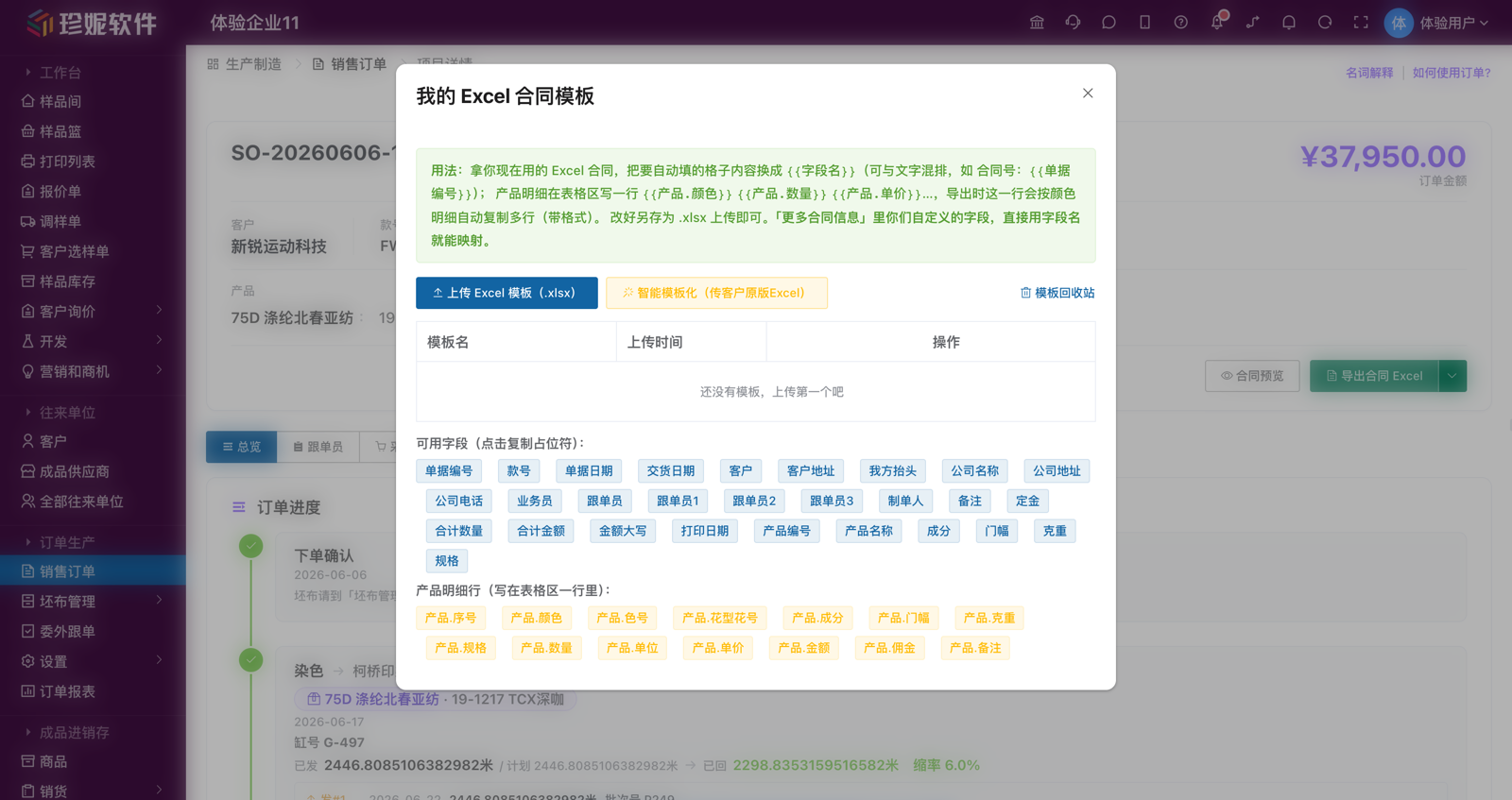
Craft fields work out of the box: every craft field configured in process settings for each process (dyeing / printing / finishing / sampling, etc.) can be used as a placeholder by its field name — whatever field name you see on the outsourcing order is exactly what you write inside {{...}} in Excel. The binding dialog lists "this process's craft fields" with click-to-copy.
Fixed fields include: document number / process / mill / dye-vat number / color / issue date / expected return date / issue quantity / unit / return quantity / processing unit price / processing fee / notes / company name / document creator / print date.
The instruction sheet can also pull fields straight from the order contract it belongs to, combining data sources: contract number / document date / delivery date / style number / customer / customer address / our company header / salesperson / tracker ({{跟单员1}} {{跟单员2}} {{跟单员3}} take the trackers one by one in order, {{跟单员}} joins all of them with the Chinese enumeration comma) / contract notes / total quantity / contract amount, plus the contract product fields product code / product name / composition / width / weight / spec / pattern & number (document-level, taking the first product); custom fields from "More contract info" use the field name directly. The {{销售订单号}} (sales order number) in older templates equals the contract number and stays compatible.
Detail rows support: line number / sample code / sample name / color / color number / pattern & number / composition / width / weight / spec / issue quantity / unit / unit price / return quantity / scrap quantity / processing unit price / amount / notes — of these, color number / pattern & number / composition / width / weight / spec / unit price are matched to the contract's product row by color automatically.
Data priority: fields the outsourcing order has values for are never overwritten by the contract; the process's craft fields take top priority.
Bind an Instruction Template to a Process — Exports Apply It Automatically
A given process usually uses one fixed instruction-sheet layout — so you can bind the template right to the process and stop picking it at export time:
- Bind / rebind: the "Order Production → (Settings flyout) → process settings" page has an "Instruction Excel" column where each process can link one outsourcing-instruction Excel template (a green tag shows once bound); in the dialog you can pick an existing template or upload a new one directly (auto-selected after upload; duplicate names are blocked)
- Auto-applied on export: once bound, exporting this process's outsourcing order automatically applies the process-linked template — no picking each time
- One-click export from the timeline: on a process node of the order detail timeline, next to "View details" there's an "Export instruction sheet Excel" button — it exports the instruction sheet with the process's linked template directly, no need to open the outsourcing detail drawer first; if the process has no linked template yet, it prompts you to link one in process settings
- No hand-typing placeholders when building a template: the binding dialog lists clickable field chips in groups — outsourcing order fields / contract fields / product detail rows / this process's craft fields — one click copies the
{{字段名}}(field name) placeholder, curly braces included
Print entries tucked away — switching to Excel output
The production orders module's original web print entries (print contract / print instruction sheet / outsourcing material-issue sheet / stock-in sheet / transfer sheet / tally receipt) have been hidden — export contracts and outsourcing instruction sheets with Excel templates directly (the layout is your own; print after exporting); the material-issue / stock-in / transfer sheets are also planned to switch to generated-Excel output — let us know if you need them.
7. Inspection
Finished goods returned from outsourcing pass inspection before stock-in:
| Inspection item | Content |
|---|---|
| Quantity check | Actual yardage vs. the outsourcing order's stock-in quantity |
| Inspection items | Item-by-item judgment (pass / fail / N/A); inspection items are customizable |
| Defect records | Defect type (oil stain / color spot / color difference / pattern misalignment / warp flaw / weft flaw / hole / other) + quantity + severity |
| On-site photos | Upload defect photos for the record |
Inspection passed → proceed to completion stock-in; handling of failures (return / negotiation) follows actual business practice.
Works with the inspection machine
Defect-detection data from Jenny Software's all-in-one inspection machine device (in development) can sync automatically into the inspection module — manual inspection plus machine assistance.
8. Finished-Goods Arrival → Inspection & Packaging → Completion Stock-In → Shipping
For the wrap-up stretch after all processes are done, the timeline has a fixed few steps — just click down through them: finished-goods arrival → (inspection & packaging) → completion stock-in → initiate shipping task → warehouse executes stock-out.
8.1 Finished-Goods Arrival (Fixed Step)
When the last process is done, before inspection / completion stock-in, first register finished-goods arrival on the "Finished-goods arrival" node and upload the roll-detail sheet (Excel / image) the last process provided. Multiple arrivals are allowed. Without registering finished-goods arrival, the first completion stock-in is blocked (historical orders that have already stocked in by batches aren't blocked).
8.2 Inspection & Packaging (Optional Wrap-Up)
After finished-goods arrival and before completion stock-in, you can register wrap-up info such as inspection / rolling / shipping out / attaching labels on the "Inspection & packaging" node, and record the "rolling fee" (linked to a contact = the payable counterparty). This step is a fixed step that does not go through issue / stock-in — just register the info + rolling fee, and it can also be skipped to go straight to completion stock-in. Which fields inspection & packaging requires, and the Excel template for the packaging instruction sheet, are configured on the "Inspection & packaging settings" page (Order Production → "Settings" flyout), see §10.
8.3 Completion Stock-In (with Roll-Detail Sheet)
"Completion stock-in" no longer requires every process to be finished — as long as any process has stocked in, you can stock-in and sell first (a partial-completion stock-in asks for a second confirmation). After a partial completion stock-in the order stays "In production", later batches can keep stocking in, and the order only advances to "Completion stock-in" once all processes are done — so staged-delivery scenarios work just as smoothly.
Completion stock-in is the warehouse's job: the salesperson / tracker can see this step on the timeline (Overview), but the actual operation should be done by the warehouse on the "Warehouse" tab by clicking "Completion stock-in." It opens a drawer that slides out on the right for entry, without navigating away.
Completion stock-in supports a full roll sheet recording each roll one by one:
| Field | Example |
|---|---|
| Roll number | R10001 / R10002 / … |
| Color | Army green / dark coffee / navy / … |
| Net length (inventory quantity, required) | 40–55 m (independent per roll) |
| Gross length | The off-loom original length, net length ≤ gross length |
| Weight / location / notes | Optional |
Net length is the only required field (with a red asterisk, must be > 0); everything else is optional. You can batch-add multiple rolls (set a default color to apply in bulk), and the system automatically totals the roll count and total yardage.
Import an Excel roll-detail sheet (integrate with the inspection system)
Don't want to type roll by roll? Click "Import Excel roll details" in the roll-detail area and feed in the roll-detail Excel exported from your external inspection system directly — the system recognizes the headers automatically and appends to the roll-detail list. Inspected rolls go straight into inventory, sparing you the re-entry.
Stock-in steps: select the linked document (outsourcing processing order / production order, quantity auto-filled) → enter roll details → select the stock-in warehouse → save, and inventory increases.
8.4 Initiate Shipping Task → Warehouse Executes Stock-Out
After completion stock-in, shipping is the only entry through which this batch's money enters finance (the old "generate sales transaction" PSI link was removed in June, unifying on order shipping):
- The salesperson initiates a shipping task: click to initiate on the "Initiate shipping task" node (multiple times, "ship another batch")
- The warehouse executes stock-out: the actual shipping is executed by the warehouse on the "Warehouse" tab — picking roll numbers / pieces for stock-out. After shipping, receivables enter finance automatically (shipped receivable), inventory is deducted
- Receipts are separate: collect receipts under "Finance → Receipt orders" (can be linked to this order's contract for offset)
A reminder if you've stocked in but haven't shipped
After completion stock-in but before shipping, the order detail pops a yellow bar: "this order has completed stock-in but hasn't shipped — the receivables haven't entered finance yet," with a "Go initiate shipping task" button next to it. This is a don't-forget-to-ship reminder; it never changes any amounts automatically.
Wrapping up after completion
Once shipping / final payment is handled, the user manually clicks "Complete order" on the order detail to wrap up (into "Completed").
9. Work-Dispatch Workbench + Work-Report Records
For companies with their own workshop (optional module):
- Work-dispatch workbench: assign production tasks to workshop teams
- Work-report records: workshop workers report "how much they completed / how long it took"
Most customers won't need this
The vast majority of fabric traders don't have their own workshop, so these two menus won't appear. They show only after a company enables the "in-house production" plugin.
10. Base Settings (Admin Configuration)
Outsourcing Unit Prices
Preset unit prices by process × mill (the unit can be entered as meter / kg / bolt / yard, etc.). When creating a new outsourcing order, you can reference the corresponding unit price.
What Else Is in the "Settings" Flyout
In June, all of Order Production's configuration was tucked into the "Settings" flyout (Order Production → hover over "Settings"); besides process settings, there's also:
- Contract template settings: maintain contract field templates + Excel contract templates, see Sales Order Contract Fields
- Greige template settings: the greige purchase order's custom fields + greige Excel template
- Inspection & packaging settings: configure the custom fields inspection & packaging requires, plus the Excel template for the packaging instruction sheet (these used to be buried in the "Register inspection & packaging" dialog and are now moved to a settings page for unified management)
- Shipping template settings: the order shipping "more info" custom fields + shipping order Excel template, one set each for domestic and export sales
- Business data: the business-data dashboard entry (opens in a new tab, visible only to authorized employees)
Process Settings (Craft Management)
Define the type + default parameters of all processes (entry: Order Production → "Settings" flyout → "Process settings"; from June, process settings is no longer a separate main menu and is tucked into the "Settings" flyout). Each process is assigned to a process category, and the categories have been reorganized into five major groups; the process settings page shows them as per-category tabs, and "Add process" on an order also picks by category:
Dyeing / Printing / Post-processing / Inspection & packaging / Weaving
- Dyeing: ordered as dyeing / finishing / yarn dyeing; yarn-dyed fabric (dye the yarn first, then weave) can use the "yarn dyeing" process (package / hank dyeing)
- Printing: the former "printing" process is renamed "water printing", and "direct-jet printing" is newly added
- Post-processing: heat setting, stentering, pre-shrinking, sanding/brushing, coating, lamination bonding, embroidery and the like all live here (the former "embroidery" category has been merged in)
- Inspection & packaging: fabric inspection, finished-goods inspection, rolling, attaching labels, etc.
- Weaving (fabric forming): winding / warping / sizing / drawing-in / weaving / knitting / greige inspection — the fabric-forming process chain before greige
The former "sampling" category has been removed; legacy processes without a category are auto-classified by name for display — existing processes are not forcibly migrated, so report any classification that looks off.
The system-preset processes cover the full chain from yarn to shipment (pretreatment, dyeing, soaping, heat setting, steaming, stentering, pre-shrinking, sanding/brushing, coating, lamination bonding, fabric inspection, finished-goods inspection, rolling, attaching labels, etc.), and each process comes with craft fields tailored to that process (e.g. soaping = soaping agent / temperature / time / cycles / fastness), instead of one shared field set per category.
Existing outsourcing orders save a snapshot of the process fields at creation time — later adjustments to the system processes do not affect existing outsourcing orders.
Each process can define custom fields (see "Process custom fields" above); when adding a field, you can "load common fields from this category's standard template." Field types support text / multi-line text / text + dropdown / dropdown / number / date — multi-line text suits long content like dyeing requirements and craft notes, shown as a multi-line input occupying a full row in the order's add-process form and the outsourcing detail; reorder fields by holding the drag handle at the start of a row (four-way arrow icon) and dragging. You can also bind an outsourcing-instruction template to a process in the "Instruction Excel" column (see §6 above).
The order's "Add process" dialog shows only the craft fields the process itself has configured — the fixed 「缸号」 (dye-vat number) field is no longer forced in; if you need one, add it yourself in the field configuration, or fill in the batch number when registering an issue batch; dye-vat numbers already filled on older orders still display normally.
The "Frequently Used" Toggle for Processes
The preset processes cover the whole chain, but no company uses them all — every process on the process settings page has a "Frequently used" toggle:
- Switch it off and the process no longer appears in the "Add process" picker on orders; the process settings page still shows everything, and you can switch it back on anytime
- The toggle only affects the picker: processes already on orders are snapshots and are never affected
- Existing companies' processes all default to frequently-used, so nothing changes; for newly registered companies, only the dyeing / printing presets and those with "packaging" in the name default to frequently-used — enable the rest as needed
- If you can't find the process you want in "Add process" on an order, a hint points you to "Process settings" to mark the corresponding process frequently-used or create a new one
- The three basic processes — dyeing / printing / packaging — are always frequently used: their toggle cannot be switched off (hover hint 「基础工序,始终常用」, "basic process, always frequently used"; the backend blocks it the same way); the preset process 「包装指示」 (packaging instruction) has been renamed 「包装」 (packaging)
- Marking a process frequently used while it has no instruction-sheet Excel bound yet triggers a soft reminder (the action is not blocked) — you can click "Bind" right on that row to set it up
Process routing / standard BOM
"Process routing" and "standard BOM" belong to the in-house production scenario — pure-outsourcing fabric traders generally don't need them, so these two menus are hidden by default (each order has a different process, so a predefined route adds little value; outsourcing also has no concept of a bill of materials).
Why It's Designed This Way
This workflow wasn't designed in a vacuum — it was honed against the real scenarios of fabric outsourcing. Each core capability addresses a pain point where things "get disputed / lose money / leak":
| Capability | The real pain point it addresses | Where it's used |
|---|---|---|
| Batched material issue / stock-in | The dye house dyes in separate vats and returns in batches — 1,000 m may split into 3 vats and 3 returns | §4 Outsourcing Management · batched model |
| Per-role tabs + amounts hidden by permission | Trackers need to follow progress but shouldn't see the transaction price / processing fee rate (prevent leaks, stop departing staff from taking commercial info) | §2 Sales Orders · per-role tabs |
| Entertainment expenses booked separately | Camping at the dye house chasing goods with cigarettes, liquor, and meals is a real cost — tally it separately without over-splitting | §4 Outsourcing Management · costs |
| Contract field templates | Contract fields vary widely by export / domestic / customer — applying a template then fine-tuning is fastest | §2 Sales Orders · contract field configuration |
| Roll-detail stock-in on completion + dual receivables | Finished goods have a different roll number / color / yardage per roll; the customer's books should only arise with actual shipping, line by line | §2 Order receivables · §8 completion stock-in |
Who This Module Suits
✅ Highly recommended:
- Fabric trading companies that mainly do outsourced processing (dye houses / finishing / printing / sampling)
- Those with no or a very small in-house workshop
- More than one tracker, needing collaboration and division of labor by role
- Many customers, many orders, frequently running multiple mills in parallel
⚠️ Partially applicable:
- Companies that are primarily in-house workshop with outsourcing as a supplement (the work-dispatch + work-report modules are usable)
- Small traders working with a single dye house (many features, but not necessarily all used)
❌ May not suit:
- Those not in fabric (the underlying logic is general, but all default configurations are for the fabric industry)
- Extremely simple operations where a single boss manages everything end to end (role division of labor may go unused)
Document Export (Excel Templates)
Contracts, production instructions, greige purchase sheets, packing documents, and shipping documents now share a consistent workflow for online preview, download, and retained Excel files. Template administrators can edit a draft, preview it, and publish it as the company version; published templates keep version history and can be rolled back where the page provides that action. After a supported business document is successfully created or edited, the system retains the Excel file generated from the template used at that time, so later template changes do not overwrite the earlier file.
The preview window can be enlarged or opened in browser fullscreen. Daily document pages focus on selecting a prepared template, previewing, downloading, and viewing retained files; company-wide upload, visual field design, publishing, and rollback stay in the relevant template settings page.
Contracts and outsourcing instruction sheets in production orders are exported via "My Excel templates": upload the Excel documents you use today, write {{字段名}} (field name) placeholders in the cells, and on export the order data fills in automatically — the layout stays 100% yours.
- Contract: one-click "Export contract Excel" at the top right of the order detail page; an order can bind a template under "More contract info", or it's brought out automatically when applying a contract template
- Outsourcing instruction sheet: on the process node of the order detail timeline, click "Export instruction sheet Excel" / "Instruction sheet preview"; each process's craft fields map directly by field name; once a process has a bound instruction template, exports apply it automatically (see §6 above)
- Shipping order: the shipping row on the Warehouse tab can "Export", with one set each of domestic and export shipping order Excel templates (configured under "Shipping template settings")
- Default template: a template can be set as the default for its document type (only one default per type), and new orders bind the default automatically; on export, templates are auto-selected in the order "order-bound template → default template → the only template", and if the bound template is deleted, exports fall back to the default instead of failing
- Template management: upload / rename / set default / delete / bind are all done uniformly on the "Contract template settings" page (Order Production → "Settings" flyout) in the "② Excel templates" tab; the "Manage my Excel templates…" item in the order detail page's "Export contract Excel" dropdown can also upload / manage. Uploading or renaming a template to a duplicate name is blocked to avoid mix-ups
- New product-detail fields: detail-row placeholders support
{{产品.成分}}(composition) /{{产品.门幅}}(width) /{{产品.克重}}(weight) /{{产品.规格}}(spec), so every row of a multi-product contract can carry its own product's values for these four — no longer limited to the first product's document-level value
For full usage, see Sales Order Contract Fields → Use Your Own Excel as the Contract Template.
Web print entries tucked away
The original web print entries ("print contract / print instruction sheet / outsourcing material-issue / stock-in / transfer sheet", etc.) have been hidden — use Excel template export for contracts / outsourcing instruction sheets; the material-issue / stock-in / transfer sheets are also planned to switch to generated-Excel output (print it yourself) — let us know if you need them.
FAQ
Q: Does this module need to be purchased separately?
A: Production orders is a standalone module in the app market; you need to enable it under "Enterprise operations → App market." See Pricing for details.
Q: We have both our own workshop and outsourcing — can we use it?
A: Yes. Outsourced processing tracking is the main line, and the in-house workshop is supplemented via "work-dispatch workbench + work-report records." The two modes can run in parallel.
Q: Trackers can't see amounts — can they look up customers?
A: They can see the customer name / order number / quantity / progress, but amount fields are hidden by permission (trackers and warehouse staff can't see unit price / processing fee / contract amount / gross margin; the buyer sees only purchase prices). This lets trackers follow progress without touching commercially sensitive information.
Q: Can one order have multiple owners?
A: There can be only 1 order owner (clear responsibility), but the sales / purchasing / warehouse / finance roles can each have multiple people, and trackers are assigned individually per outsourcing process. To change the owner, just edit it in the order — the system logs it.
With separate assignment authorization, a supervisor or scheduler can update the owner and collaborators without full order-edit permission. The assignment entry changes people only; it does not change amounts, products, status, or notes.
Q: After completion stock-in, how do I issue the sale and collect money?
A: From June, everything unifies on order shipping (no more generating a PSI sales transaction). After completion stock-in, the salesperson clicks "Initiate shipping task" on the order's "Overview" timeline, and the warehouse picks roll numbers and pieces to execute stock-out on the "Warehouse" tab — after shipping, receivables enter finance automatically and inventory is deducted automatically. Collect receipts separately under "Finance → Receipt orders" (can be linked to this order's contract for offset). If you've stocked in but haven't shipped, the order pops a yellow bar reminding you not to forget.
Q: How do I use the mill-direct-to-next-process feature?
A: After the dye house finishes, it ships directly to the next mill (finishing / printing) instead of returning to your own warehouse. On stock-in, check "return material and transfer to next process" — the goods transfer directly to the next process's outsourcing order, saving one stock-in + stock-out cycle. If you need an "outsourcing transfer sheet" for the driver / mill to keep on file: its system print entry has been hidden, and the document is planned to switch to generated-Excel output (print it yourself) — let us know if you need it.
Q: How is shrinkage calculated for batches?
A: Each batch is calculated independently as (issued − returned) / issued, and the outsourcing order computes a total shrinkage overall. Batches exceeding the agreed limit are highlighted and can trigger a "shrinkage compensation" misc. cost.
Q: Do misc. costs have to be linked to a batch?
A: Not necessarily. They can be attached to the outsourcing order as a whole (e.g. one lump gift to the dye house) or to a single batch (e.g. compensation for one ruined vat). Whatever's most convenient for your bookkeeping.
Q: Does it cost money for a tracker to upload on-site photos?
A: No. Photos / videos are stored in the company cloud disk (the production orders module's shared quota); normal usage won't exceed the limit. See Cloud Disk and File Sharing for details.
Q: Is a process's custom field configuration used only within our company?
A: Yes, each company configures it independently. When adding a field, you can "load common fields from this category's standard template," then adjust as needed.
Q: Can we stock-in directly without inspection?
A: Yes. Inspection is now a kind of "process," not a mandatory step — after completion you can go straight to completion stock-in. But keeping an inspection record on file is recommended.
Q: How do I reconcile processing fees with the dye house?
A: After each outsourcing order is completed, the system auto-calculates the processing fee as stock-in quantity × unit price, then adds each batch's shipping / entertainment / material and other costs to form the payable amount on that order; each order's cost details can be reviewed and reconciled line by line on the order detail and the outsourcing order detail. Unpaid processing fees flow into the financial payables summary and supplier statistics; when paying, tick the outsourcing orders on the payment order under "Finance → Payment orders" to offset them directly — the offset amount writes back to the outsourcing order's paid amount automatically.
Q: A process is completed but a batch was entered wrong — how do I fix it?
A: After completion, issue / stock-in batches are locked. Click "Undo completion" on the process first, fix the batches, then re-complete — shrinkage, totals, scrap remainders, and the paid amount are recalculated automatically, the related financial offsets are reversed, and the action is logged in the order timeline. Note: undo is not allowed once the next process has issued material.
Q: Can I stock-in and ship before all processes are finished?
A: Yes. As long as any process has stocked in, you can click "Completion stock-in" to stock-in and sell first (with a second confirmation); the order stays "In production", later batches can keep stocking in, and the order only advances to "Completion stock-in" once all processes are done.
Q: Can an order still be edited after it's completed / closed?
A: Orders in the completed / closed status can no longer be edited — only viewed. After completion stock-in, the order enters "awaiting shipping wrap-up"; once handled, you manually close the order.
Q: Can contracts / instruction sheets use our own Excel format?
A: Yes — and it's the recommended way. Take the Excel contract / instruction sheet you use today, replace the cells you want auto-filled with {{字段名}} placeholders, and upload it; on export the system fills the document data into your layout. For product details, write one row of {{产品.颜色}} {{产品.数量}} — on export that row is duplicated automatically per color detail line. See Sales Order Contract Fields.
Custom Services
Every company's production workflow is different
Production management in the fabric industry is highly non-standardized —
- Some companies only dye, not print
- Some have their own weaving workshop and don't need to purchase greige
- Some need multiple finishing processes chained together
- Some have unique approval workflows and reporting needs
Jenny Software's production orders module provides the fabric industry's general standard workflow, covering the core needs of most companies. If you have personalized customization needs, contact us — we can develop a custom solution around your actual business workflow, priced separately according to the complexity of the requirement.
Related Articles
- Pricing — Production orders module pricing / app market overview
- Staff and Role Management — Assign permissions to trackers
- Inventory Features in Detail — Greige purchasing via PSI / finished-goods inventory and shipping stock-out
- Sales Order Contract Fields — Contract field templates + using your own Excel as the contract / instruction sheet template
- Contacts and Data Permissions — Managing customers / processing mills
- Field Management — Configuring process custom fields