
Multi-User Task Collaboration
Overview
Jenny Software gives fabric companies a flexible kanban-style multi-user task collaboration system (similar to a Teambition project board): each column is one stage of your business workflow, tasks flow between columns as cards, and the team collaborates to complete every stage of the order cycle.
Three highlights
- Kanban grouping: build columns around your own workflow (sample inquiry / quotation / greige / sampling / printing & dyeing…), with task cards flowing clearly between them
- 🆕 Related resources: a task can be linked directly to business objects like samples, quotations, sales orders, and purchase orders — open the task to jump straight to the related data, no more back-and-forth searching. See Resource Linking
- 🆕 Works on the mobile app too: view tasks, change statuses, and join discussions even when you're out
Task templates
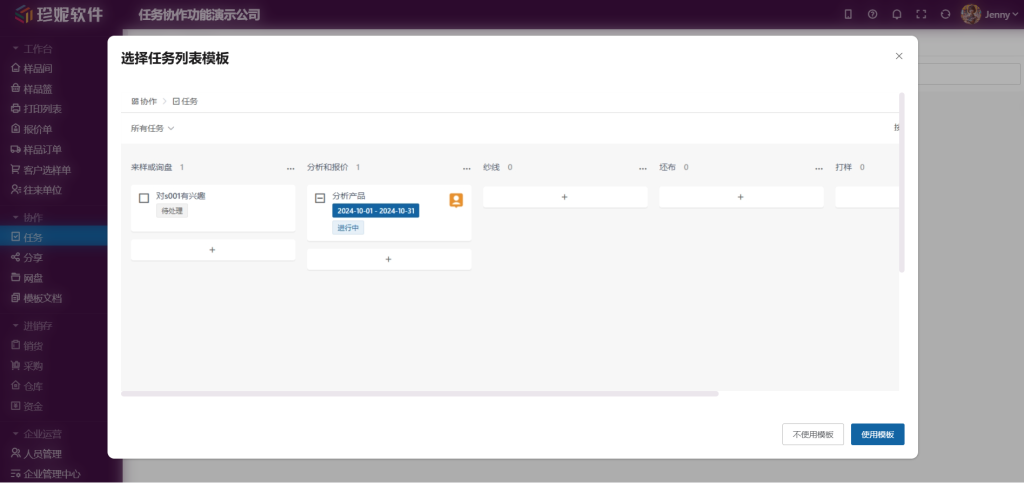
The first time you enter the task screen, the system asks whether you want to use a preset template. The current template for fabric trading companies includes these steps:
- Sample request or inquiry
- Analysis and quotation
- Yarn
- Greige
- Sampling
- Dyeing or printing
- Post-processing
- Inspection and shipping
You can choose to use the template or configure your own.
Managing task lists
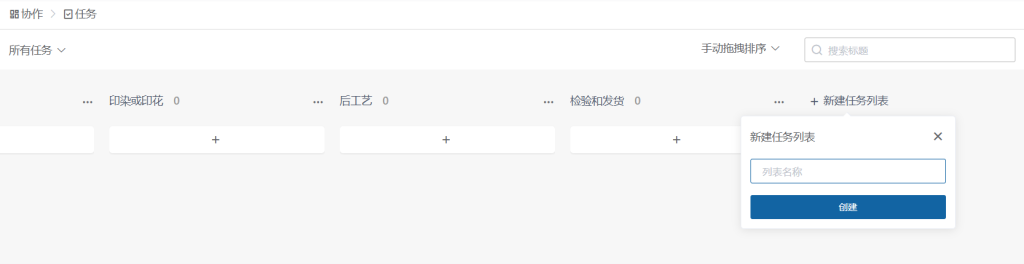
Each column is called a "task list" and represents one stage of the business workflow. The following operations are supported:
- Add: click "New task list" at the end of the lists to add a new status
- Reorder: drag a list header to swap its position
- Delete: remove task lists you don't need
Creating a task
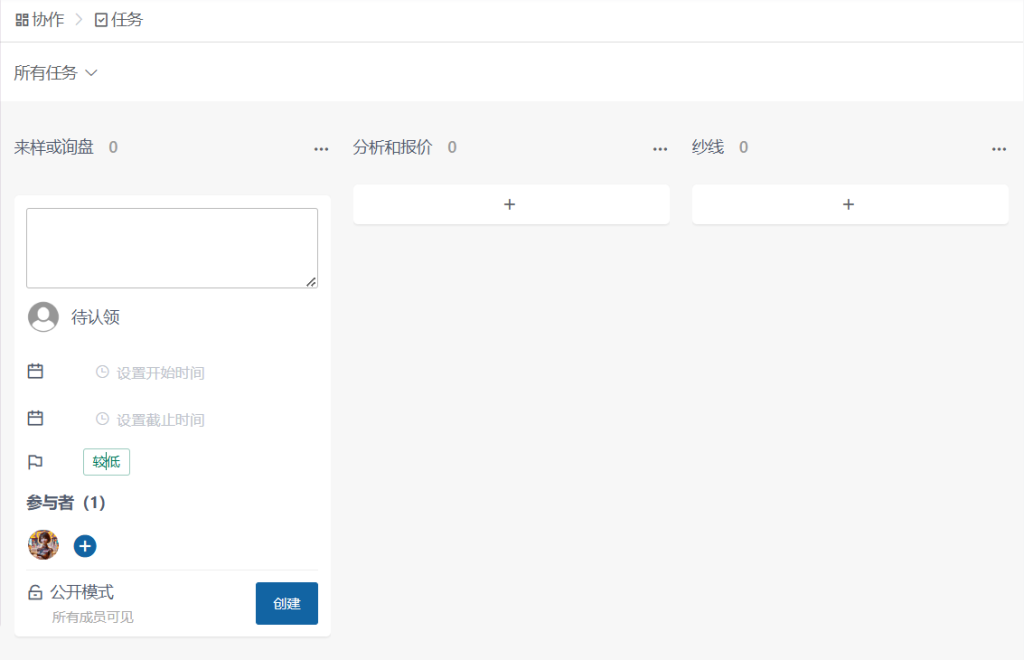
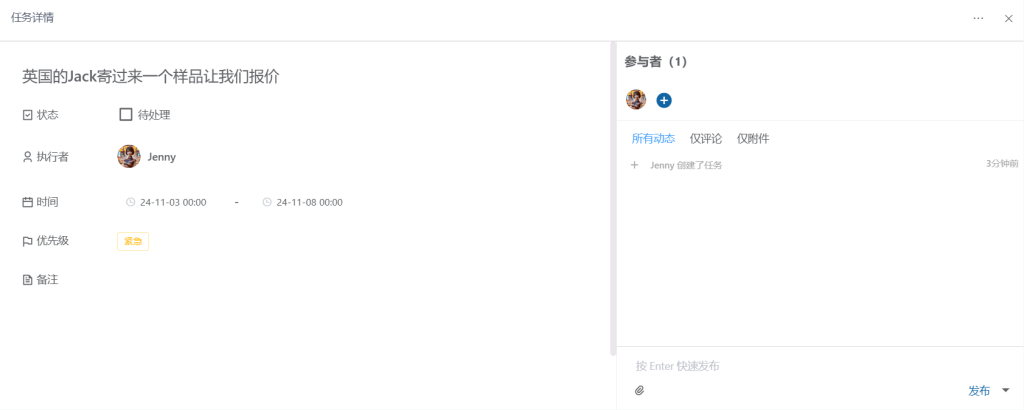
Click the "+" under a task list to quickly add a task, including the following settings:
| Item | Description |
|---|---|
| Task details | The first input field |
| Assignee | Single-person assignment (left unassigned, it shows as "to be claimed") |
| Time | Start time and due time |
| Priority | Indicated by different colors |
| Participants | Multiple participants who receive notifications |
Note: There is only one "assignee," but there can be multiple "participants." Participants receive various notifications.
Tracking tasks
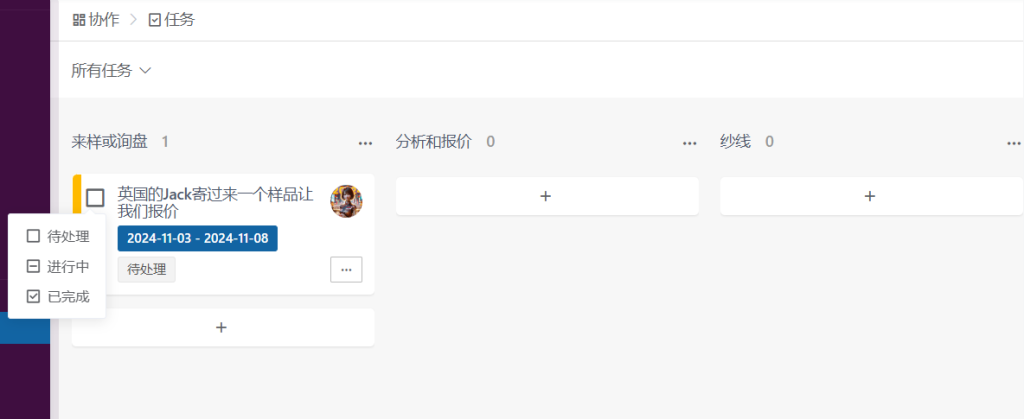
- The task summary appears in the list, with color indicating priority
- The checkbox before a task toggles its status: To Do → In Progress → Done
- Status changes notify all participants
- Completed tasks are visually distinct
Task details
Click a task card to expand its details, which include:
- Status / assignee / time / priority / notes: basic info, editable anytime
- Related resources: click "+ Add from resources" to link samples, quotations, sales orders, and other business objects (see below)
- Participants: multiple participants who receive notifications
- Activity + comments: every action leaves a trace (who changed the status, who updated the notes); at the bottom you can post comments and upload attachments, all visible to participants
- Print: a Print button in the top right of the details prints the current task's details (status, notes, related resources, activity & comments) for the record—handy when going over orders in an offline meeting
🆕 Resource linking (very handy)
Task details have a "Related resources" section. Click "+ Add from resources" to link a task to a specific business object:
- Samples / quotations / sample dispatch orders / selection orders / inquiry orders / sales orders / production orders / purchase orders
- Other tasks / shares / cloud drive files
Once linked, opening the task lets you see / jump straight to the related samples and documents, with no more digging around. This is what sets Jenny's collaboration apart from generic collaboration tools — collaboration is built directly on top of your fabric business data. See Resource Linking.
Works on the mobile app too
Collaboration is now live on the mobile app, so you can view the task board, change task statuses, and join discussions even when you're out. See Jenny Fabric Software App.
Core advantages
The task feature lets you:
- Customize task lists to match your company's business workflow
- Flexibly set assignees and participants
- Enter detailed information (priority, time, reminders, comments, resources, etc.)
- Manage task statuses
- Maintain a clear mapping between tasks and owners
- Keep an overall grip on order progress (with task linking)