
Image Search
Who this is for
"A customer brings in a small swatch and wants to find the matching item," "you see a competitor's product and want to check whether you have it," "a customer sends a photo and you need to locate it fast" — image search is built for exactly these scenarios.
Jenny Software's image search is specially optimized for fabric texture / pattern / color, finding similar items in your own sample library within seconds.
Entry Points
PC
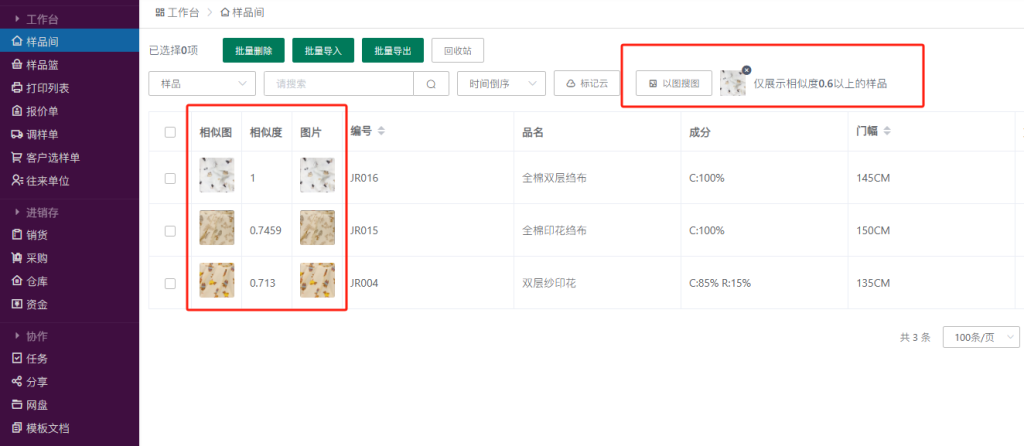
Sample room → "Image search" button (camera icon) on the right of the top search bar → upload an image or drag it in → it searches automatically.
App
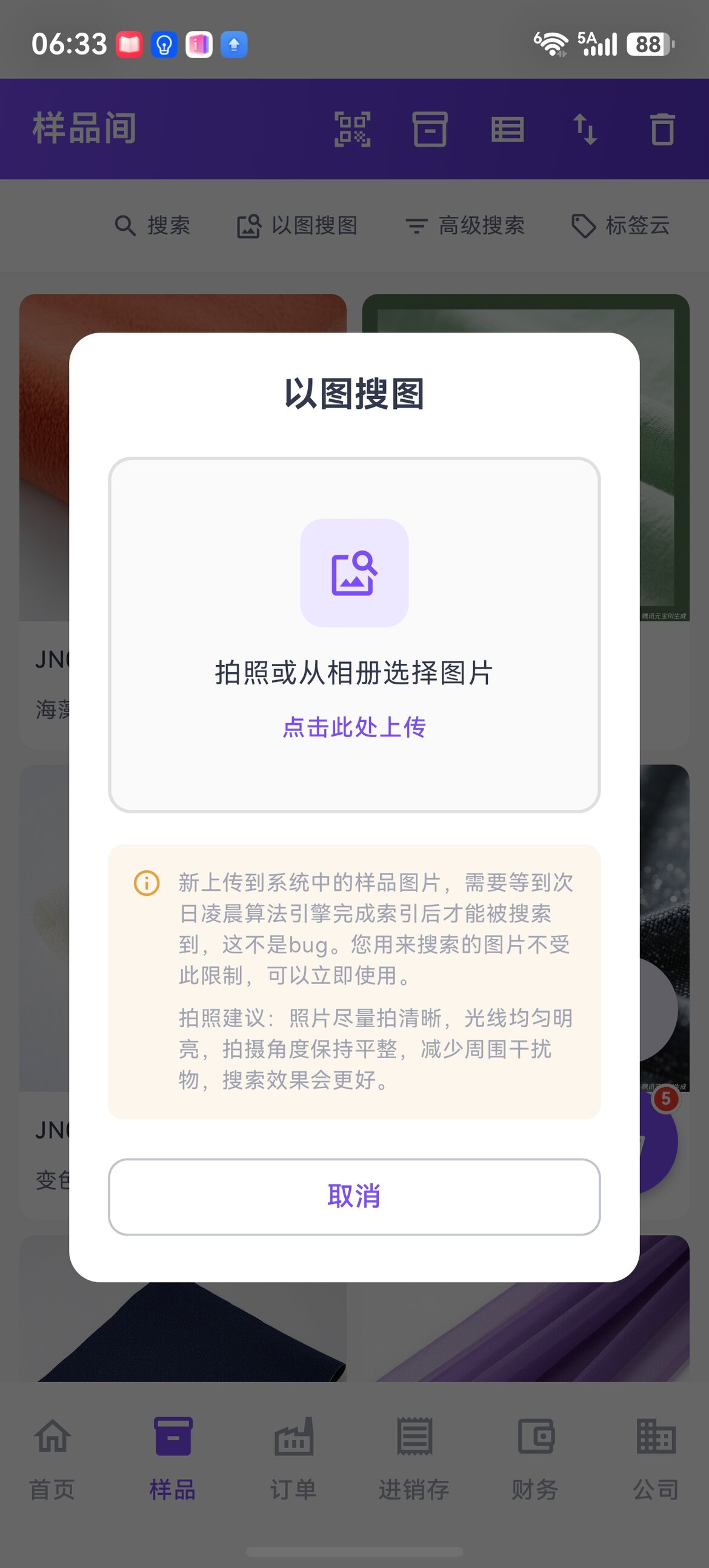
Sample list → camera icon on the right of the top bar → take a photo / pick from the album → it searches automatically.
PC · Pattern Library (Search Patterns by Image)
The pattern library supports image search too: left menu "Development" (hover to expand) → "Pattern Library" → the 以图搜花 (Search Patterns by Image) button at the top → drag a pattern image in or click to upload → within seconds it finds similar patterns in your library. Results are shown under an "image search results" tag — click the × to return to the normal list.
- It only searches your own company's pattern library and doesn't mix in samples (sample image search won't return patterns either — the two don't interfere)
- It shares the same activation as the sample image search: if image search is activated for samples, it works in the pattern library right away; if not yet activated, you'll be guided to the App Market
- Patterns join the search index automatically once saved — give it a moment and they'll be searchable
Search Results
- Sorted by similarity, from high to low
- Only samples with similarity ≥ 60% are shown (below 60% the system deems it unreliable and returns nothing)
- Whether your library has 100 items or 100,000, everything above 60% is listed (not just the top N)
- Each result is labeled with its similarity percentage and the matched image source (public image / internal image / color SKU image)
Search Scope
Covers all sample images in the sample room:
| Image type | Included in search |
|---|---|
| Public library (externally shareable) | ✅ |
| Internal library (visible to staff) | ✅ |
| Color / SKU images (a separate thumbnail per color) | ✅ |
| Private library (visible only to yourself) | ✅ (only you can find it) |
Indexing Time
How long before it's searchable
After a sample image is added or changed, indexing usually takes effect within a few minutes; when the system is busy, it catches up automatically by early the next morning at the latest. If it can't be found temporarily, try again later.
The image you use to search has no restrictions whatsoever — just upload it and search.
Robustness (What It Can Recognize)
The system is fairly robust to common photo "imperfections"; the following usually don't affect the hit rate:
| Scenario | Affects results? |
|---|---|
| Objects beside the fabric (keys / hand / phone) | ❌ No — the system locates the fabric area |
| Tilted shooting angle | ❌ No |
| Indoor / outdoor lighting differences | ❌ No |
| Full pattern / partial pattern crop | ❌ No — both find the corresponding full item |
| Partial crop (only a corner shot) | ✅ Slight effect, but usually still findable |
Tips to Improve the Hit Rate
Shooting
- Flat shot + white / solid background is best
- Reduce clutter in the frame (keys, phone background, etc.)
- For openwork fabrics (lace / mesh), shoot against a solid background to avoid see-through
- For multiple repeat patterns → you can crop to a single pattern before uploading for higher accuracy
- An ordinary phone photo is fine — no DSLR needed
Image Quality
| Requirement | Note |
|---|---|
| 2 MB or more recommended | Enough clarity, texture details preserved |
| Avoid below 20 KB | Too blurry, texture lost, inaccurate search |
| Phone original is best | Use the original from the album, don't compress |
When You Can't Find It
- Nothing on the first page → flip through the top 10 results; order is by similarity, it may be 4th–7th
- Still can't find it → check whether your sample library truly doesn't have it, or re-shoot from a different angle / partial crop and search again
Applicable Scenarios (Three Typical Cases)
1. A Customer Brings a Swatch to Find the Matching Item
The salesperson snaps a phone photo → App image search → locates the matching item code in the library in seconds → quotes on the spot.
2. Spotting a Competitor's Product and Checking Your Own Library
You see a great fabric at a trade show / on social media → snap it → search whether you have it → decide whether to re-sample / copy the design.
3. A Customer Sends a Photo Asking "Do You Have It?"
A customer sends a fabric photo over WeChat → upload it straight to image search → instantly know whether you have it → reply within 1 minute.
FAQ
Q: A just-uploaded sample isn't searchable?
A: Wait a moment and try again. Indexing for newly added / changed sample images usually takes effect within a few minutes; when the system is busy, it catches up automatically by early the next morning at the latest. If it still can't be found the next day, contact support.
Q: Why do some searches return 10 results and others only 1?
A: The system only returns samples with similarity ≥ 60%. When only one item in the library is a true match, only 1 is returned; when there are many items with the same color / pattern / similar texture, all that clear the 60% threshold are listed.
Q: Can the 60% similarity threshold be adjusted?
A: It's currently fixed at 60% and not adjustable. This threshold strikes a balance between "rather miss some distant matches" and "not misjudge a pile of irrelevant items."
Q: Which kind of image is most accurate?
A: Flat shot + white background + HD original (2 MB+). A phone original uploaded directly works very well.
Q: Can others find samples in the private library?
A: No. Private images can only be found by the user who owns them. Public / internal images are searchable by everyone (subject to their own data permissions).
Q: Can it search for things other than fabric (e.g. finished products / shoes & bags)?
A: Both fabric images across samples and pattern images in the pattern library are supported (for the pattern-library entry, see "Search Patterns by Image" above — it searches patterns only and doesn't mix in samples). Finished products / shoes & bags / home textiles don't have dedicated image search yet, but if a finished product is already linked to a fabric → after finding the fabric you can jump to the finished product.
Q: Does each search cost money?
A: It's not billed per use. Image search first needs to be activated under "Enterprise Operations → App Market" (currently a limited-time ¥0 activation — go by the App Market's price on the day); once activated it's unlimited and consumes no AI credits, for both samples and the pattern library. See Pricing for details.
Q: Can I search in bulk?
A: Currently it's single-image search, one at a time. For bulk scenarios, contact support for an assessment.
Q: Can overseas customers use it too?
A: Yes. The buyer app / WeChat mini program / overseas App all support image search, ideal for export customers finding goods by photo.
Related Articles
- Sample Management — Sample entry and image management
- Image Category Explanation — Public / internal / private library rules
- Jenny Fabric Software App — Image search is most used on mobile
- AI Smart Recognition — Snap a label to auto-fill the form / snap a color card to recognize color numbers
- Pricing