
Finished Products
The Finished Products module is for managing the finished samples your fabric customers create—sample garments, shoes/bags/accessories, home textiles, and more. Once a fabric is sold to a customer, you can photograph and record whatever finished product they make with it and link it back to the original fabric, making it easy to showcase and trace later.
Who It's For
- Fabric trading companies: Archive the finished products customers make from your fabrics as case studies.
- Brands / design studios: Organize your own sample garments and accessories by collection.
- Home textile factories: Manage finished samples of bedding, cushions, towels, and the like.
Three Categories
Sample Garments (Clothing)
Apparel finished products. Preset subcategories:
- Dresses / Shirts / T-shirts / Knitwear / Hoodies
- Trousers / Shorts / Skirts
- Suits / Coats / Down jackets
- Sleepwear / Underwear / Children's wear / Other
Shoes, Bags & Accessories (Accessory)
Apparel accessories. Preset subcategories:
- Shoes / Hats / Bags
- Ties / Scarves / Silk scarves / Headscarves
- Socks / Gloves / Belts / Other
Home Textiles (Home)
Household textiles. Preset subcategories:
- Curtains / Blankets / Bedding
- Cushions / Tablecloths / Rugs / Towels / Other
Subcategories can be expanded to fit your own business; the preset values are just common options.
Numbering Rule
Finished product numbers are generated automatically in the format: SY + date + 6-digit sequence
For example, SY260426000123 = the 123rd finished product on April 26, 2026.
Entry Fields
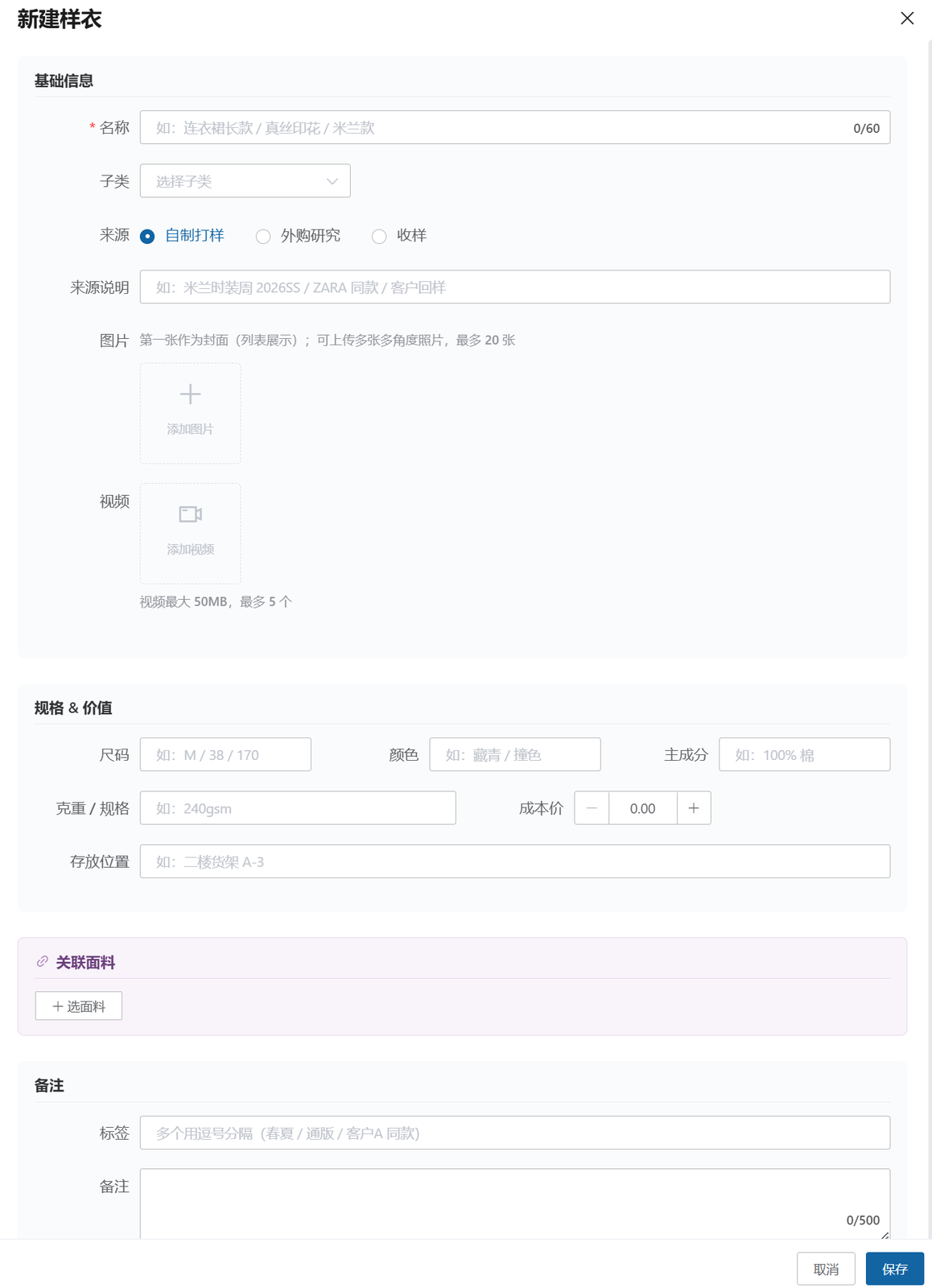
Basic Info
- Number (auto-generated) / Name
- Category (Sample Garment / Shoes, Bags & Accessories / Home Textile)
- Subcategory (e.g., Dress)
- Source: In-house sampling / Purchased for research / Sample received
- Source notes (e.g., Milan Fashion Week 2026SS / same as a ZARA item / sample returned by customer)
Specifications & Value
- Size / Color / Main composition / Weight
- Cost price
- Storage location
Linked Fabrics ⭐ Core
- One finished product can be linked to multiple fabric samples used in it.
- On the detail page, click a linked fabric to jump to its fabric details.
Photos & Videos
- Up to 20 photos
- Up to 5 videos
Status
- In stock / Lent out / Lost / Disposed of
Other
- Tags / Notes / Custom fields
Deriving Fabric Samples (Core Workflow)
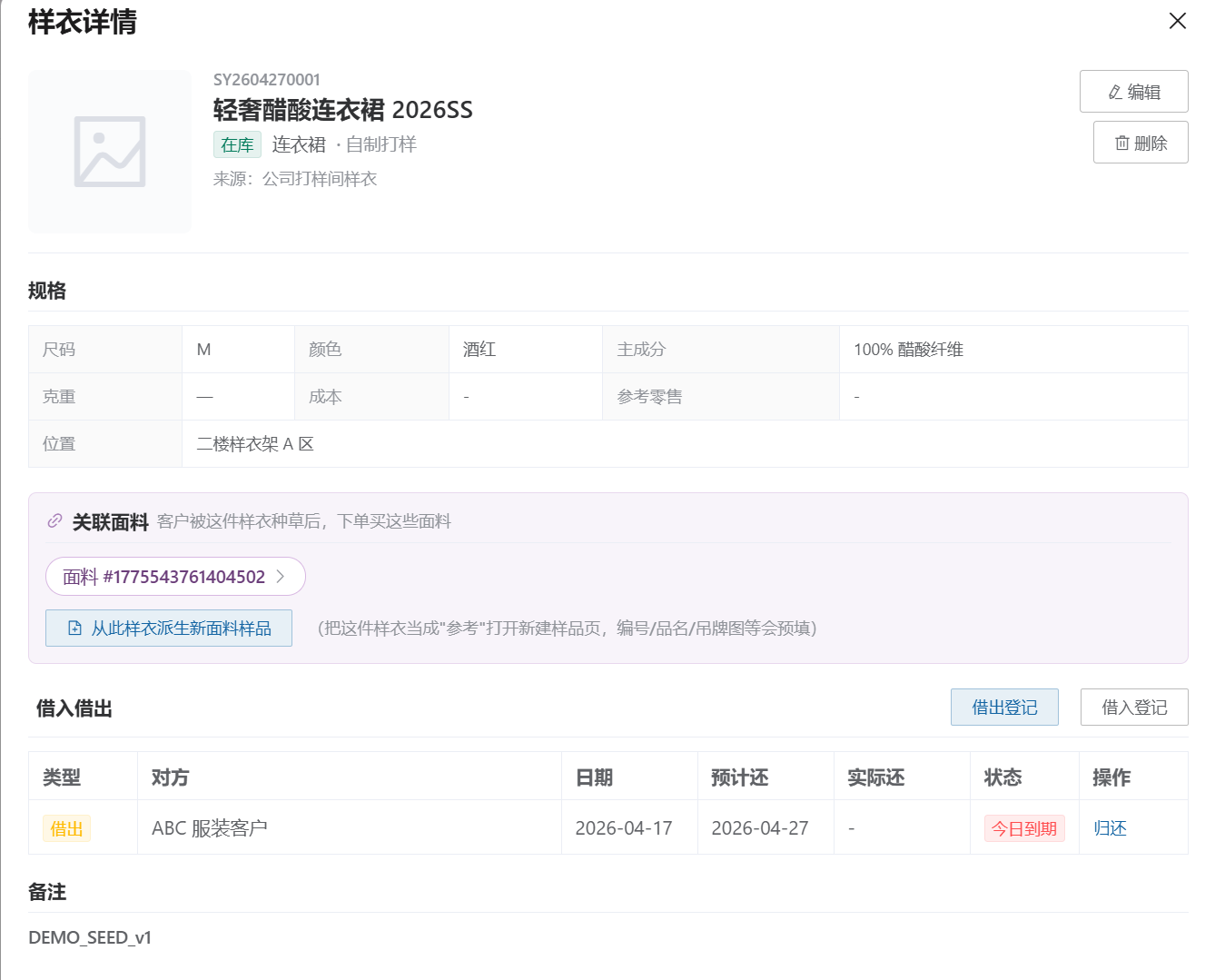
For a fabric merchant, the ultimate goal of managing sample garments is to sell more fabric. The flow:
- A customer is inspired by a sample garment: they spot a garment in your showroom or sample room.
- See which fabrics were used: jump directly from the linked fabrics section on the detail page.
- Place a fabric order or derive a new sample.
The finished product detail page has a "Derive a new fabric sample from this garment" button:
- Clicking it jumps to the new sample page.
- It auto-fills the name, composition, weight, cover image, and more.
- Ideal for the "a customer brings in a garment and wants the same fabric made" scenario.
Lend In / Lend Out Management
Finished products often need to be lent to customers and designers to try on or photograph. The system supports a complete lend-in/lend-out log:
- Lend out: record who it was lent to, the lend-out date, and the expected return date.
- Lend in: finished products borrowed from outside can also be recorded.
- Return: process the return and update the status.
- History: view the complete lend-in/lend-out history on the detail page.
Status changes automatically with each lend-out/return action, so you never lose track of a sample garment.
Where to Find It
Left menu, Workbench (工作台) group → Development (开发, hover to expand) → the Finished Products column:
- Sample Garments
- Shoes, Bags & Accessories
- Home Textiles
Since June 2026, the Finished Products entry has moved from the "Opportunities" menu to the new Development (开发) menu — development sampling and finished products are now managed under one roof. The features themselves are unchanged, and roles with the "Sample Garments" permission can keep using the entry from the Development menu without any extra configuration.
Common Scenarios
Scenario 1: Apparel Trading Company
A customer comes in for sampling, and you photograph and store the finished garment → use "Link Fabrics" to record which fabrics were used → later, when customers visit the showroom, they can see "what kind of garment this fabric can make."
Scenario 2: Buyer / Design Studio
Photograph and record designer garments bought on business trips by category → later derive fabric samples from the garments to place production orders.
Scenario 3: Home Textile Factory
Photograph and archive each newly designed bedding set or cushion → link the fabrics and fillings used → customers can see the real-world result when making their selection.
Related Articles
- Development (Sampling Management / Pattern Library) — The sampling and pattern features of the Development menu, where Finished Products now lives
- Sample Management — Fabric sample management (the link target for finished products)
- Sample Stock — Stock tracking for samples and finished products
- Sample Basket — Sample collection