
Sample Stock
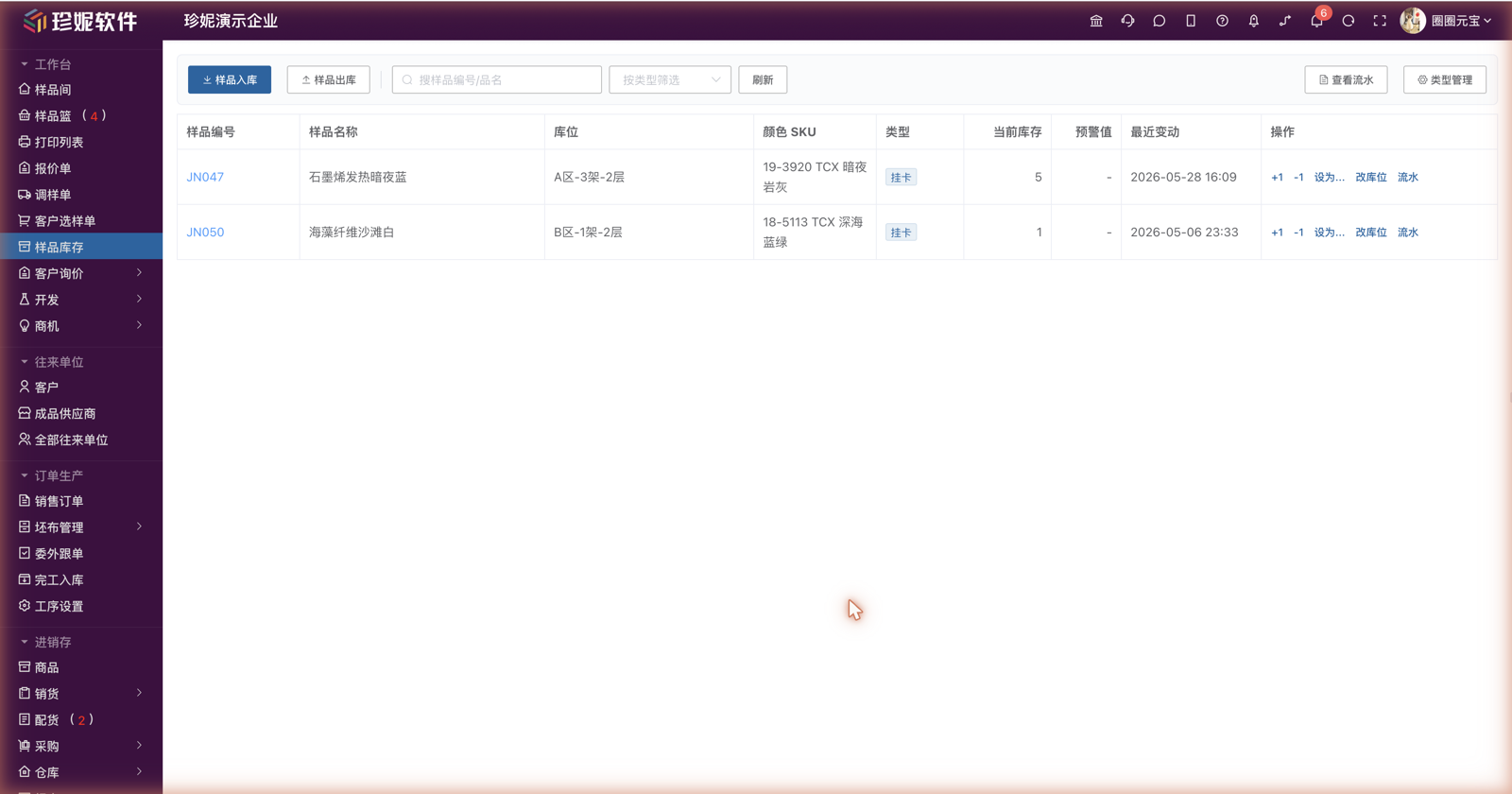
Sample Stock tracks how much of each sample you currently have left. Fabric merchants are repeatedly asked "Do you still have a hanging card for this one?" and "How many meter swatches are left?"—with Sample Stock, you can check and adjust it anytime.
Why You Need Sample Stock
Samples and goods (bulk stock) are two different things:
- Goods stock = rolls of bulk fabric in the warehouse
- Sample stock = the small cards, swatches, meter swatches, and kilo swatches used to show and send samples to customers
Samples are consumed quickly and must be tracked independently—otherwise you only discover they're gone when it's time to send them.
Sample Types
The system presets 4 types, consistent with the sample types on selection orders / sample dispatch orders:
| Type | Description |
|---|---|
| Hanging card | An A4-sized color hanging card, the most commonly used |
| Meter swatch | A swatch cut from 1 meter of fabric |
| Kilo swatch | A continuous length of sample fabric measured by the kilogram |
| A4 swatch | An A4-sized small swatch |
A company can customize new types to fit its own business (menu → Type Management).
Entry Point
Sample Library → "Sample Stock" (at the same level as the customer selection order).
Operations
Top Buttons
- Stock in: a dialog to select sample + SKU + type + quantity for bulk stock-in
- Stock out: a dialog to select sample + SKU + type + quantity for bulk stock-out; you can optionally fill in the salesperson and customer (which customer the samples went out to), making it easy to trace where samples ended up
Inline Actions
- +1 / -1: single-step adjustment (-1 when you take one)
- Set: directly set the current quantity
- Change location (改库位): edit the sample's storage location directly (see "Location Management" below)
- Log: view the full change history of this stock record
Type Management
A dialog to manage your company's sample types (add / edit / delete).
Location Management
The sample stock list includes a "Location" column showing where in the warehouse each sample is kept (taken from the sample's storage-location field).
You can change it right on the stock page, without opening the sample edit page:
- Click "Change location" (改库位) in the row
- Select or type the location in the dialog—multiple locations are allowed (e.g., Zone A – Rack 3 – Level 2); press Enter after typing a new location to create it, or pick from existing locations (with auto-complete and de-duplication)
- On save it is written to the sample's storage-location field, and the stock list updates accordingly
The location is a position marker stored on the sample. It only helps you remember "where it is" and does not affect stock quantities or the log.
Automatic Stock Deduction from Sample Dispatch Orders
When you send samples to a customer, the system can automatically deduct sample stock, saving manual work:
How to Use
- When creating a sample dispatch order, enable the "Deduct sample stock" toggle
- After saving, the system automatically deducts from stock based on the samples/quantities on the dispatch order
- Editing the dispatch order: stock is automatically adjusted by the net change (send more, deduct more; send fewer, return the difference)
- Deleting the dispatch order: stock is automatically restored
Log Sources
Each stock log entry is tagged with its source:
- Manual: adjusted via the page buttons
- Sample dispatch order: deduction triggered by a dispatch order
- Selection order: deduction triggered by a selection order
- Batch import: initialized during import
- Garment loan-out: deduction of related samples when a garment is loaned out in garment management
Viewing the Log
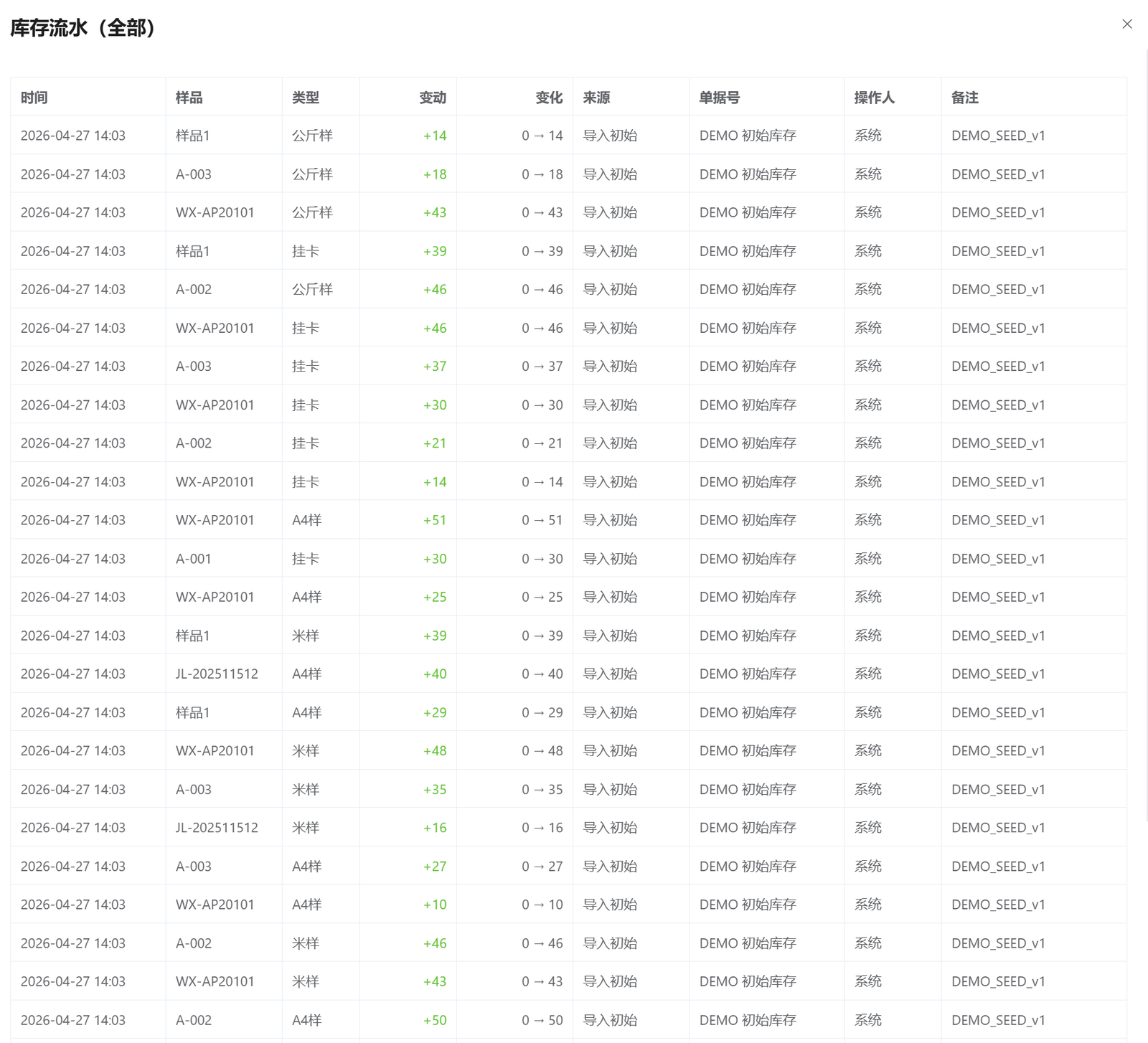
Each stock record has a complete log:
- Time / operator / change quantity / before → after
- Salesperson / customer: on manual stock-out you can optionally record the salesperson and the customer (who the samples went out to); each is shown as its own column in the log list, displayed as — when not filled in
- Source document: clickable to jump to the corresponding sample dispatch order / selection order / garment loan-out record
- Note: you can record a reason during manual operations
Trace exactly where every sample went—no more "I can't find where this sample was sent".
Common Scenarios
Scenario 1: Quick Stocktaking
Open the sample stock list → use the "Set" button to update each sample's actual quantity once → stocktaking done in one pass.
Scenario 2: Never Forget to Deduct When Sending Samples
Enable "Deduct sample stock" when creating a sample dispatch order → once the samples reach the customer, the stock count decreases automatically → next time the same sample runs out, you'll be reminded when creating an order.
Scenario 3: Low-Stock Reminder
For samples whose sample stock has reached zero, the system shows a "low stock" reminder when you create a sample dispatch order, so you don't promise to send samples only to find there are none.
Relationship with Other Modules
| Module | Relationship |
|---|---|
| Sample Management | The base data of samples (code/name/images, etc.) |
| Quotation / Sample Dispatch Order / Selection Order | Business documents for sending/selecting samples, linked to stock deduction |
| Garment Management | Related sample stock can be deducted when a garment is loaned out |