
Sales Order Contract Fields
Contract fields vary widely from one fabric company to another — export trade has L/C number / port of loading / shipping marks, domestic sales has payment terms / logistics method, and even within the same company the contracts used for different customers may differ.
Jenny Software gives sales orders two layers of capability:
- Contract field templates (the "More contract info" section): decide which fields the contract has — 7 preset templates (3 export + 4 domestic) as a starting point; add fields / edit fields / drag to reorder / set default values
- Excel contract templates (export): decide what the exported contract looks like — upload your own Excel contract, write
{{字段名}}placeholders in the cells (the placeholder uses the field label as shown in your software), and on export the order data fills into your layout; you can also bind a contract field template to an Excel template so new orders apply both automatically (see "Use Your Own Excel as the Contract Template" below)
"Making templates" and "creating orders" are now two separate places, each with its own job
Making templates (creating / editing templates, setting field default values, binding Excel, setting a default, uploading Excel) is all done once on the "Contract Template Settings" page and captured for the whole company; when creating an order you only "select a template" to apply it plus fine-tune for that order — clean and tidy.
This was a June redesign — previously "Save as template" on the order-creation page would fold this order's filled values back into the template and could even bleed into other templates, which got messy; now everything about templates is gathered onto the settings page, the order-creation page no longer sets default values, and orders don't affect one another.
Where to Configure / How to Use
Maintaining Templates: the Contract Template Settings Page (captured for the whole company)
Everything about templates is done here, once:
- Left menu → Production orders → hover over "Settings" (the fly-out menu on the right) → under "Production settings" click "Contract template settings" (or go directly to
/manufacturing/contractTemplate) - The page has two tabs:
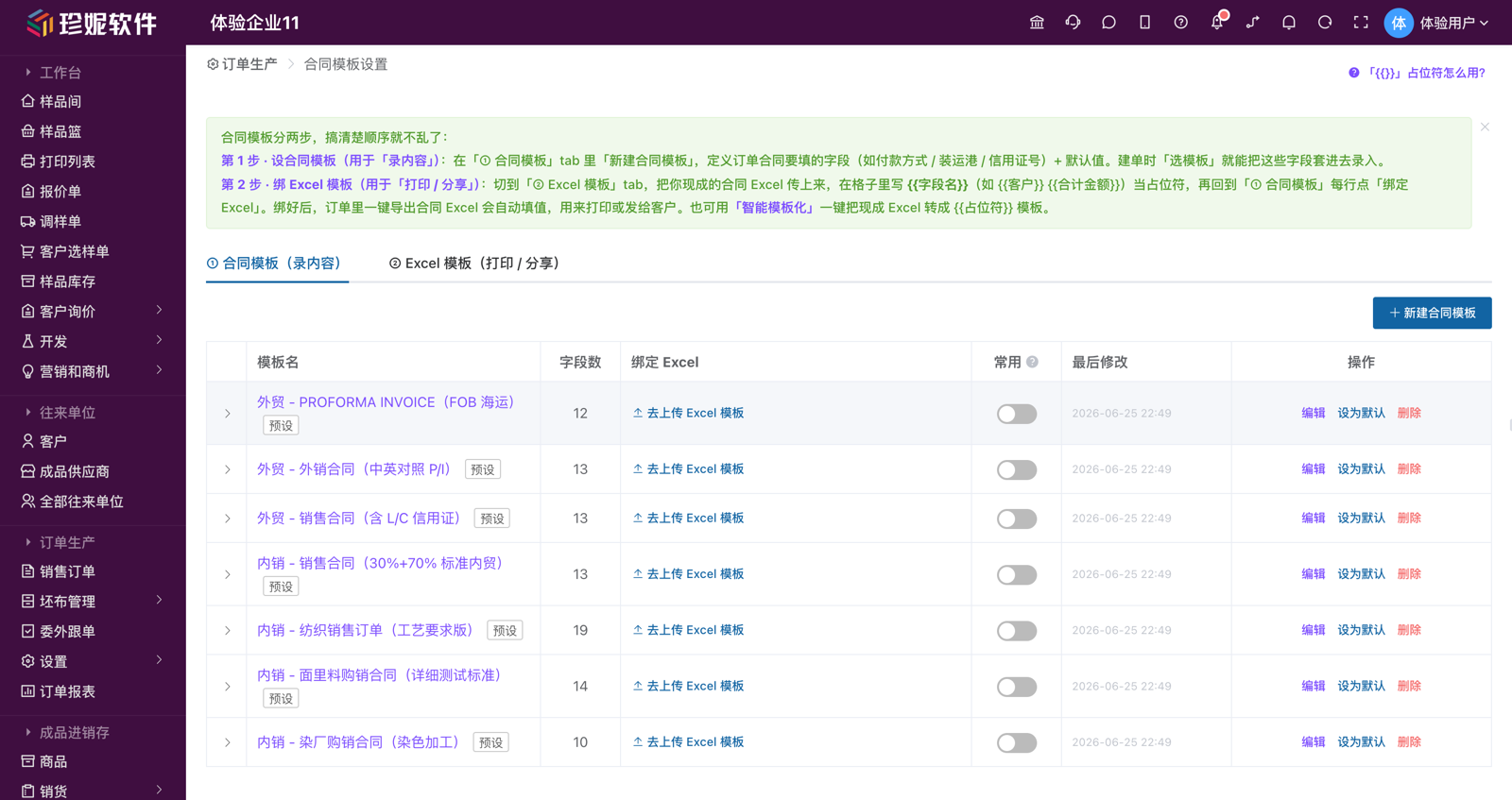
- "① Contract templates (enter content)": maintain contract field templates. Click "New contract template", name it → add fields / drag to reorder / fill a default value for each field / tick required, then save; in the list you can "Edit", "Set as default", and "Delete" a template, and a "Bind Excel" column lets you attach an Excel directly to a template (step 2 below). Each template has a "Common" toggle: turn it off and it no longer appears in the "Select template" dropdown when creating an order (but it's still visible on the settings page, and orders that already used it are unaffected)
- "② Excel templates (print / share)": upload / manage your own Excel contract templates, detailed below in "Use Your Own Excel as the Contract Template"
- Set a field's default value right in the "Default value" box on the field row (for dropdown types you can type a new option directly and press Enter); when a template with default values is applied to an order, they're pre-filled automatically, leaving little more than adjusting the numbers when creating an order
Templates are shared at the company level; an order saves a snapshot of the field definitions applied at the time, so editing or deleting a template afterward does not affect orders already created.
Applying a Template + Adjusting Fields When Creating an Order (Salesperson)
- Left menu → Production orders → Sales orders → New, and fill in basic info such as customer / style number / delivery date / product colors and quantities
- In the "More contract info" section, click "Select template" → choose a preset (or a company template saved on the settings page) → the field set and default values are brought in automatically
- On the brought-in fields, continue to "Add field", "Edit / Delete", and "Drag to reorder", adjusting as this order requires (fields lay out two per row — compact and easy to fill); temporary changes on this order do not affect the template itself
- Some dropdown fields let you pick a built-in candidate value directly (manual entry of new values is also supported)
Want to capture a new template, or change a template's default values? Go to the Contract Template Settings page (previous section) — the order-creation page itself no longer has "Save as template", so this order's values can't bleed into a template.
Set as Default (Auto-Apply on New Orders)
On the Contract Template Settings page, in the "① Contract templates" list, click "Set as default" on your most-used template — from then on, new orders apply this field set automatically, and the fields' default values (e.g. payment method T/T 30%+70%, trade mode FOB) are pre-filled too, leaving little more than adjusting the numbers when creating an order. The default template is unique within a company, and you can "unset default" or switch to another at any time.
The 7 Preset Contract Templates
The system presets 7 contract field templates for each company as a starting point, covering common export / domestic scenarios. When creating an order, apply the one that fits your business, then adjust as needed:
| # | Template | Scenario / Key fields |
|---|---|---|
| 1 | Export – PROFORMA INVOICE (FOB ocean) | P/I number / PO number / trade mode / port of loading / port of destination / payment method / quantity tolerance / currency |
| 2 | Export – Export contract (bilingual P/I) | P/I number / shipment time / transshipment allowed / partial shipment allowed / advising bank / beneficiary |
| 3 | Export – Sales contract (with L/C) | Signing date / shipping marks / port of shipment / payment terms / L/C number / arbitration body |
| 4 | Domestic – Sales contract (30%+70% standard) | Style number / settlement method / delivery location / shipping method / freight bearer / objection period / invoice type / tax rate |
| 5 | Domestic – Textile sales order (process-spec version) | Work number / color-matching light source / finished width / composition / color fastness requirement / shrinkage requirement / PH value / inner label / outer label |
| 6 | Domestic – Face/lining purchase contract (detailed test standards) | Bulk number / post-treatment / composition, yarn, weave & weight / effective width / test standard / head-sample confirmation requirement / acceptance deadline |
| 7 | Domestic – Dye house purchase contract (dyeing processing) | Style number / payment method / delivery time / acceptance method / freight bearer / re-dye terms / unit price notes |
Preset templates come with industry-fitting default values (e.g. payment method defaults to "T/T 30%+70%", with color fastness / test standards filled in as full paragraphs), so you can apply one and tweak it to use. The preset templates themselves can also be edited.
Field Types
When adding or editing a field, each field can be one of these types:
| Type | Suits | Example |
|---|---|---|
| Single-line text | Short fields | Contract number, port of loading, shipping marks |
| Multi-line text | Multi-line notes | Payment terms, test standards, remarks |
| Number | Numeric values | Quantity, piece count |
| Date | Dates | Signing date, shipment period |
| Single-select dropdown | Fixed options (manual entry also supported) | Currency, trade mode, payment method |
Built-In Candidate Values for Dropdown Fields
Some dropdown fields in the templates come with common candidate values for direct selection when creating an order (manual entry of new values is also possible):
| Field | Built-in candidate values (examples) |
|---|---|
| Trade mode | FOB / CIF / CFR / EXW / DDP / DAP |
| Transaction currency | USD / EUR / CNY / GBP / JPY / HKD |
| Payment method | T/T 100% in advance / T/T 30%+70% / L/C at sight / L/C 30 days / D/P / D/A / O/A |
| Shipping method | Land freight / sea freight / air freight / express / self-pickup |
| Freight bearer | Seller / buyer (or Party A / Party B) |
| Invoice type | VAT special invoice / VAT general invoice / no invoice |
| Tax rate | 13% / 9% / 6% / 3% / 0% |
| Color-matching light source | D65 / TL84 / CWF / U30 / F / A |
Candidate values are preset within each template and differ by template; dropdown fields you add manually can have their own options filled in too.
Use Your Own Excel as the Contract Template (Export)
Many companies already have an Excel contract they've used for years. No need to change formats — upload it as a template, and on export the system fills the order data in automatically:
Three Steps to Get Started
- Adapt your template: take the Excel contract you use today and replace the content of the cells you want auto-filled with
{{字段名}}placeholders (the placeholder uses the field label exactly as shown in your software; it can be mixed with other text, e.g.合同号:{{单据编号}}— the text "Contract no.:" followed by the document-number placeholder). For product details, write a single row in the table area with{{产品.颜色}}{{产品.数量}}{{产品.单价}}… (product.color / product.quantity / product.unit price) — on export, that row is automatically duplicated into multiple rows (formatting included) per color detail line. When done, save as .xlsx - Upload: go to the Contract Template Settings page (Production orders → "Settings" fly-out → "Contract template settings") → switch to the "② Excel templates (print / share)" tab → "Upload new Excel template". A single template can't exceed 10MB; for the legacy .xls format, save as .xlsx first; template names must be unique — uploading or renaming to a duplicate name is blocked, so pick another name
- Export: open any order detail page and click "Export contract Excel", then pick a template. The "Available placeholders" panel at the bottom of the tab lists every available field — click one to copy the placeholder
The "How do I use the
{{ }}placeholders?" button at the top-right of the "② Excel templates" tab holds a complete placeholder usage guide (with examples and caveats) — if you're not sure how to write a template, open it for a look first.
Don't Want to Type Placeholders by Hand? Use "Smart Templatizing" to Convert in One Click
Don't want to hunt cell by cell to fill in {{ }}? On the "② Excel templates" tab click "Smart templatize (upload the customer's original Excel)" and upload your un-edited original contract Excel directly — the system recognizes cells like "contract no. / customer / quantity" and replaces them with the corresponding placeholders for you, generating a ready-made template, and it also gives you a conversion report telling you which fields it recognized. After conversion you can preview it online, then go back to "① Contract templates" and "Bind Excel" to a template. Free for all companies.
Bind a Template for One-Click Direct Export
Bind a contract field template together with an Excel template to make order creation easier: on the Contract Template Settings page, in the "① Contract templates" list, every template has a "Bind Excel" column — select an Excel and bind it (re-bindable / unbindable). Once bound, when you "Select template" and pick this contract field template while creating an order, the order's "Contract Excel template" is brought out automatically as the bound Excel; on the order detail page, click the "Export contract Excel" main button to export directly in one click, and the dropdown marks that template "★ bound to this order".
The order-creation page's "More contract info" also has a "Contract Excel template" selection bar, where you can temporarily swap in a different Excel for this order, or click "Upload / manage Excel (go to Contract Template Settings)" to jump to the settings page. The "Manage my Excel templates…" option in the "Export contract Excel" dropdown on the order detail page can likewise upload / manage.
Set a Default Template (Auto-Bound on New Orders)
On the Contract Template Settings page, in "② Excel templates", "Set as default" on your most-used Excel template — when an order has no template bound, export falls back to it. On export, the template is picked in the order bound to this order → default template → the company's only template: even if the template bound to an order is deleted later, it automatically falls back to the default — export never fails for that reason. Each document type can have only one default; setting another replaces it automatically.
Available Fields
| Category | Fields (written as {{字段名}}) |
|---|---|
| Header | 单据编号 (document number) / 款号 (style number) / 单据日期 (document date) / 交货日期 (delivery date) / 客户 (customer) / 客户地址 (customer address) / 我方抬头 (our company header) / 公司名称 (company name) / 公司地址 (company address) / 公司电话 (company phone) / 业务员 (salesperson) / 跟单员 (trackers) / 跟单员1 (tracker 1) / 跟单员2 (tracker 2) / 跟单员3 (tracker 3) / 制单人 (document creator) / 备注 (notes) / 定金 (deposit) / 合计数量 (total quantity) / 合计金额 (total amount) / 金额大写 (amount in words) / 打印日期 (print date) / 产品编号 (product code) / 产品名称 (product name) / 成分 (composition) / 门幅 (width) / 克重 (weight) / 规格 (spec) |
| Product detail row (written on one row in the table area) | 产品.序号 (line no.) / 产品.颜色 (color) / 产品.色号 (color number) / 产品.花型花号 (pattern & number) / 产品.数量 (quantity) / 产品.单位 (unit) / 产品.单价 (unit price) / 产品.金额 (amount) / 产品.佣金 (commission) / 产品.备注 (notes) / 产品.成分 (composition) / 产品.门幅 (width) / 产品.克重 (weight) / 产品.规格 (spec) |
| "More contract info" custom fields | Use the field name directly, e.g. {{装运港}} (port of loading) {{付款方式}} (payment method) — whatever fields each company customizes can be mapped, zero configuration |
The order context also recognizes aliases:
{{订单编号}}={{单据编号}}(order number = document number),{{订单日期}}={{单据日期}}(order date = document date) — both spellings fill in, so use whichever your template calls it.
"卖方抬头" (seller header) has been renamed to "我方抬头" (our company header)
The contract's "seller header" field is now called "我方抬头" (our company header) everywhere — the order form label, the detail-page field block, and the Excel placeholder all use the new name — and on the order form it has moved from its own row to the 3rd column of the style number / delivery date row, right below the customer field. In Excel templates, use {{我方抬头}}; the old {{卖方抬头}} is discontinued and exports as blank — if an older template still uses the old name, just change the placeholder to the new one. Existing order data is unaffected.
A few thoughtful details:
The product detail row's 产品.成分 / 产品.门幅 / 产品.克重 / 产品.规格 take each row's own product values — on a multi-product contract, every line's composition / width / weight / spec lines up; the header-area 成分 / 门幅 / 克重 / 规格 are document-level fields that take the first product's values
{{跟单员1}}/{{跟单员2}}/{{跟单员3}}take the first three of the order's 「跟单员」 (trackers) in order, and{{跟单员}}joins all the trackers with the Chinese enumeration comma{{金额大写}}automatically outputs the RMB amount in Chinese capital characters (the convention on Chinese contracts)When a cell contains nothing but a single placeholder, the numeric type is preserved — quantities / unit prices stay numbers, so the sum formulas in your template keep working
Misspelled / unrecognized placeholders are left blank on export (no error), which makes iterating on a template painless
Horizontally merged cells in the product template row carry over to every duplicated row; vertical (cross-row) merges are not yet supported
Quotations / sample dispatch orders / outsourcing instruction sheets export the same way
The same mechanism is already wired into quotations, sample dispatch orders, and outsourcing instruction sheets: click "Export with my template" on the corresponding detail page, and use "Download sample template" (it ships with an "instructions" worksheet listing every available field) — reshaping the sample into your own layout is the fastest path. Outsourcing instruction sheets can additionally map each process's craft fields directly (the field name = exactly what you see on the outsourcing order), and can pull fields from the order contract they belong to (contract number / delivery date / customer / our company header / salesperson / tracker / total quantity / contract amount, etc.) plus contract product-row fields (detail rows match by color automatically: color number / pattern & number / composition / width / weight / spec / unit price) — fields the outsourcing order has filled itself take precedence, and craft fields take top priority; see Production Order Management.
How this relates to "contract field templates"
- Contract field templates (the first half of this article) govern "which fields the contract has and what gets filled in when creating an order"
- Excel contract templates govern "what the exported contract file looks like"
They work together: define and fill the fields in "More contract info" → write {{字段名}} placeholders in your Excel template → export, and out comes the finished contract.
FAQ
Q: Is each company's contract templates independent?
A: Yes, each company is independent — every company gets the 7 preset templates, and the templates you save yourself are visible only within your own company; they don't affect one another.
Q: I used to be able to "Save as template" on the order-creation page — where did it go?
A: It moved to the standalone "Contract Template Settings" page (Production orders → hover over "Settings" fly-out menu → Production settings → Contract template settings). Making templates, setting field default values, setting a default, and binding Excel are all done there; the order-creation page only "selects a template" to apply it plus fine-tunes for that order. This change roots out the old problem of "Save as template" bleeding an order's values into the template, so orders don't affect one another.
Q: If I edit a template, will orders created earlier change?
A: No. An order saves a snapshot of the field definitions applied at the time, so editing or deleting a template afterward does not affect orders already created.
Q: Is it okay not to apply a template or fill in these fields?
A: Yes. Contract fields are optional — you can create orders normally without applying a template; the basic sales order fields (customer / product / quantity / delivery date / unit price / style number) are enough.
Q: Can these fields appear in the exported contract?
A: Yes. In your Excel contract template, write {{字段名}} — the field name being exactly what's displayed in the interface — and on export it's replaced with the value filled in on this order. Whatever fields each company customizes can be mapped, with no configuration at all.
Q: Are Excel contract templates independent per company?
A: Yes — each company's are independent and shared within the company: a template a colleague uploads is available to everyone in the company at export time.
Q: What are the requirements for an uploaded Excel template?
A: .xlsx format (for the legacy .xls format, open it in Excel and save as .xlsx first), and a single file no larger than 10MB.
Related Articles
- Production Order Management — The complete production orders workflow
- Field Management — General field customization
- Document Editor — Print template customization
- Staff and Role Management — Field management permission configuration
- Quotation, Sample-Adjustment, and Sample-Selection Sheets
- 5-Minute Beginner's Guide